What should you hand Cursor before asking for a premium SaaS dashboard?

If Cursor keeps returning cramped cards and weak hierarchy, give it a visual target and measurable layout rules before asking it to build. Treat the reference as a brief to interpret, not a screen to copy: name what to preserve, what to change, and how you will judge the result.
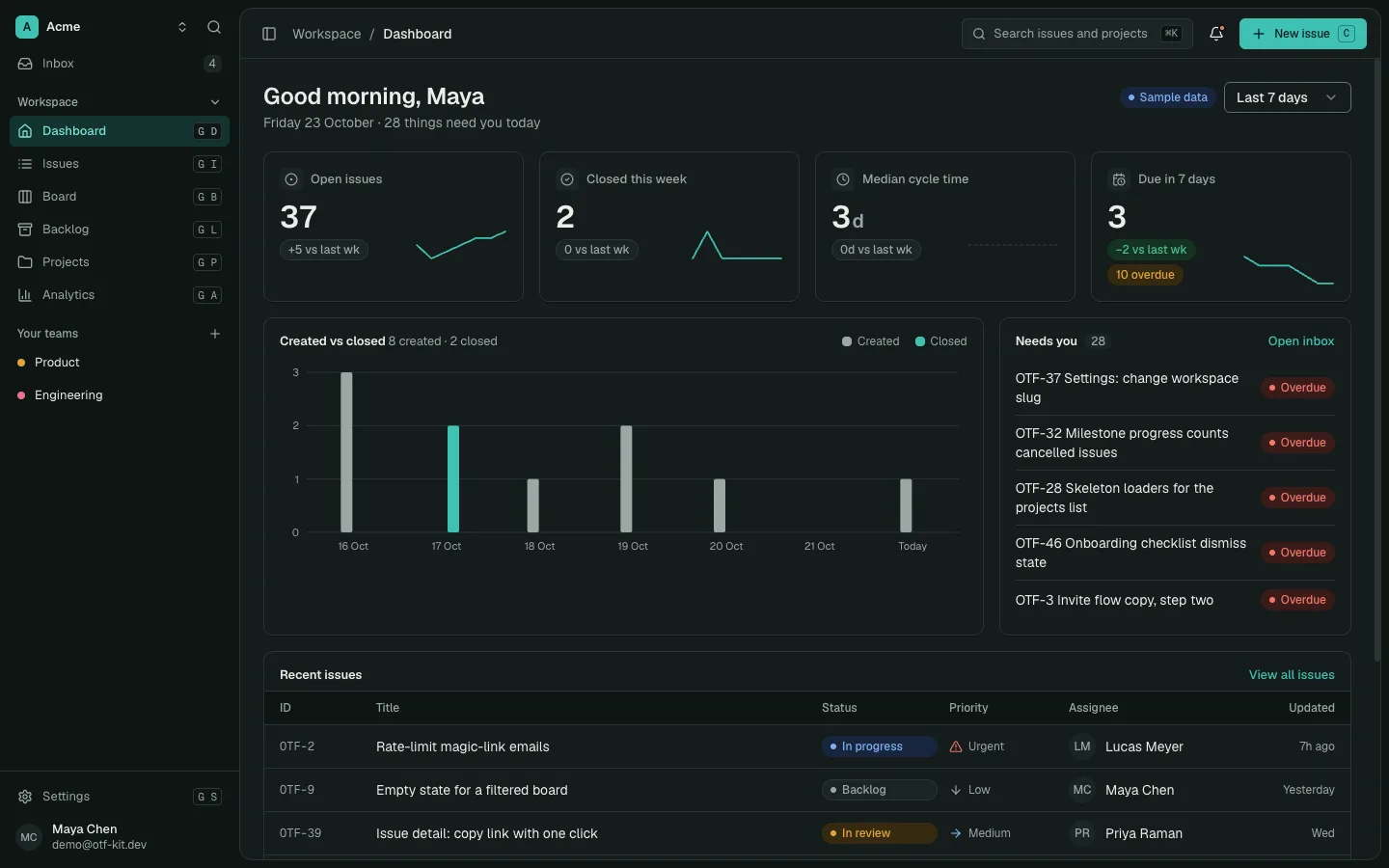
For a web SaaS foundation, inspect the OTF SaaS Dashboard Kit first, then click through the live demo. The page lists 24 screens, editable full-stack source, authentication, projects, teams and analytics; it does not promise to make a new product's design decisions for you.
Why a detailed prompt can still produce a generic screen
“Make this feel premium” describes a reaction, not an implementation. It leaves the agent to choose page structure, content density, type scale, spacing, colors, component patterns and interaction states. A long prompt can still leave those decisions open.
That gap appeared in a June 2026 r/cursor discussion. The original poster said detailed prompts and a reference image still led to a generic dashboard, then asked whether screenshots, moodboards or a design system would help. A commenter recommended a repository design-system file with concrete palette, spacing, component patterns and links or screenshots. The poster later updated that exporting a design made with Claude Design as a zip and giving it to Cursor worked well for them. That is one builder's report, not a guarantee that any tool or file format will produce the same result.
The practical lesson is to separate the visual decision from the coding request. First decide what the page should communicate and which visual properties matter. Then ask the agent to implement a bounded screen against those decisions.
Choose one reference that answers a real question
Do not send a folder of attractive screenshots and ask the agent to combine them. Pick one or two references that answer a specific question about the screen you are building.
For example, a project dashboard might borrow the way one product groups navigation, while using another reference only to understand how a dense activity table handles column labels. Write down the exact observation: “The left rail stays fixed while the work area scrolls,” or “The table gives status a narrow column and leaves the longest width to the task name.” Avoid instructions such as “make it like Linear” unless you identify which part of the screen and what behavior you mean.
Use references you can inspect and are allowed to use. Save the source URL and a capture date in your notes. Do not copy a competitor's logo, wording, or unique illustration.

11 production screens. Login and database wired.
The SaaS Dashboard Kit includes login, a database, and a working dashboard. Live demo at saas.otf-kit.dev.
Turn visual taste into a short rules file
Cursor's documentation describes project rules in `.cursor/rules` as version-controlled `.mdc` files, with frontmatter controlling when they apply. It also documents `AGENTS.md` as a Markdown alternative. Keep the rules small enough to review and specific enough to check.
Start with constraints that affect the current screen:
```md
description: Dashboard layout and visual constraints globs: src/pages/dashboard/** alwaysApply: false
- Use the existing page shell and shared components.
- Keep the primary content in one main column with a narrow navigation rail.
- Use the spacing and type tokens already defined in the project.
- Keep one primary action visible in the page header.
- Do not add a card grid for content that is a sortable list.
- Preserve the existing light and dark theme behavior.
- Ask before adding a new font, color token, or component library. ```
The example is a starting point, not a universal style system. Replace each line with a decision grounded in your repository and chosen reference. If a rule is not relevant to the page or cannot be checked in review, leave it out. Cursor's rules guide says project rules use `.mdc` files in `.cursor/rules`; a plain `.md` file in that directory is not recognized as a project rule. If you prefer a plain Markdown instruction file, the documentation identifies `AGENTS.md` as an alternative.
Specify hierarchy before decoration
Write the screen's reading order in plain language. A dashboard could place the page title and one primary action first, a small set of current indicators second, and the detailed table or activity feed below. A billing view may need the renewal date and account state before secondary metadata. These are examples; your screen's purpose decides the order.
For each section, answer four questions:
- What should a user notice first?
- Which action should be easiest to find?
- What information can move below the fold or into a detail view?
- Which empty, loading and error states need their own layout?
Then specify limits the reviewer can observe: maximum content width, number of top-level sections, table columns, heading scale, spacing tokens and the intended responsive change. Refer to existing tokens instead of inventing hex values or pixel measurements when the project already has a system. If it does not, define a small set and review it before applying it across the app.
Give Cursor a narrow implementation task
Once the visual decisions are clear, ask for one screen, not an entire product. Point to the reference capture, the relevant rule file, and a nearby component that already handles the same kind of data. Name the files the agent may edit and the files it must leave alone.
```text Build the dashboard overview in the existing page shell.
Read the dashboard rules and inspect the current dashboard components first. Use the attached reference only for the left-rail width and table density; do not copy its brand, content, icons, or colors.
Keep the title and primary action in the header. Show the current account state before secondary metrics. Use the existing table component for the activity list. Keep the current theme tokens and responsive breakpoints.
Do not add a new component library or change routing. If the existing table cannot support the required state, stop and report what is missing.
After the change, compare a screenshot at desktop and phone widths against the reference notes. Report the files changed and any visual mismatch. ```
The most important sentence is the stopping rule. Without it, an agent may fill a missing component with a new dependency or quietly alter adjacent screens. A bounded request gives you a smaller result to inspect and makes it easier to tell whether the reference was followed.
Review the output against the brief
Do not grade the screen by whether it looks fashionable. Compare it against the decisions you wrote down. Check whether the primary task is visible, whether the page has the intended reading order, whether repeated elements line up, and whether the layout survives the target phone width.
Use a short review list:
- Is the main action visible without competing with several equally loud buttons?
- Does the page show the information a user needs before secondary detail?
- Are spacing and type consistent with the existing tokens?
- Did the implementation create more cards or sections than the brief calls for?
- Do loading, empty, error and narrow-screen states preserve the same hierarchy?
- Did the agent reuse the existing shell and data components?

If the result misses, report one observed mismatch at a time. “The table feels off” invites another round of guessing. “The status column is as wide as the task name, so the title wraps at desktop width” describes a testable problem. Keep the reference, rule file and screenshot together so the next pass does not restart from taste alone.
Evaluate a dashboard starter by what it gives you
A dashboard starter can provide working screens and source that you adapt, but it cannot select the right information hierarchy for your product. Inspect the live app before buying and compare its existing screens with your own brief. The OTF SaaS Dashboard page lists email sign-in, projects, teams, issues and analytics screens, plus an API and Postgres database. It also states that subscription billing for your own product is not included. Confirm the current limits on the product page rather than assuming the starter covers your roadmap.
The useful purchase question is not “Does this look premium out of the box?” It is “Does the starting screen structure fit the product I am building, and can my team change it without replacing the foundation?” Try one representative extension in the live demo, note the components and states you would keep, and list the screens you would still need to design. That exercise gives Cursor a more concrete brief and gives you a fairer way to compare starters.
Sources — 24 October 2026
- r/cursor: “How do you get Cursor to build premium SaaS UI instead of generic AI-looking interfaces?” — observed 24 October 2026. The original poster describes cramped layouts, too many cards, weak hierarchy and inconsistent spacing; the update reports one workflow that worked for them.
- Cursor Rules documentation — accessed 24 October 2026. Documents `.cursor/rules` project rules, `.mdc` format and `AGENTS.md` as a Markdown alternative.
- OTF SaaS Dashboard Kit — accessed 24 October 2026. Current screens, source, authentication, database and billing-limit details.
For another decision before you start, read how to build an admin panel with AI you actually own. The two pieces answer different questions: this one helps define and review the visual brief; that one covers the owned admin app's roles, data and audit structure.
Ship your first screen tonight — free starter in your inbox
The quickstart, the SDK repo and the live kit demos, on this screen and in your inbox.
No spam. Unsubscribe any time.