How to build an admin panel with AI you actually own

Hosted internal-tool canvases are excellent at one job: put operator tables in front of employees without asking anyone to own a product repository. That loop is real for a one-off ops view.
It is the wrong system of record when the admin panel is the production app. Ops and support staff need roles, data tables, and an audit trail inside software you brand, deploy, and keep changing. Renting a canvas forever leaves those surfaces on a vendor host — and leaves Cursor or Claude Code without project memory beside the screens.
The saas-dashboard kit answers that narrower job. You already use a filesystem agent. You need an employee/ops admin as ordinary source agents can extend. This post is a how-to for that build order: roles, then tables, then audit rows you keep, then agents. It is not another internal-tools platform comparison — for that contrast see Retool and Appsmith fit internal tools; a SaaS dashboard kit owns the product repo. It is also not the live demo tour or the stay-in-the-IDE SaaS prompt loop. Those posts exist. This one is how to build the panel.
What the kit actually ships for admin work
OTF lists the SaaS Dashboard Kit on https://otf-kit.dev/templates/saas-dashboard and in the kit table on https://otf-kit.dev/docs/templates/overview. Standalone price is $99; also in the Everything Bundle on https://otf-kit.dev/pricing. Live proof before checkout: https://saas.otf-kit.dev.
Public product claims that matter for an employee/ops admin:
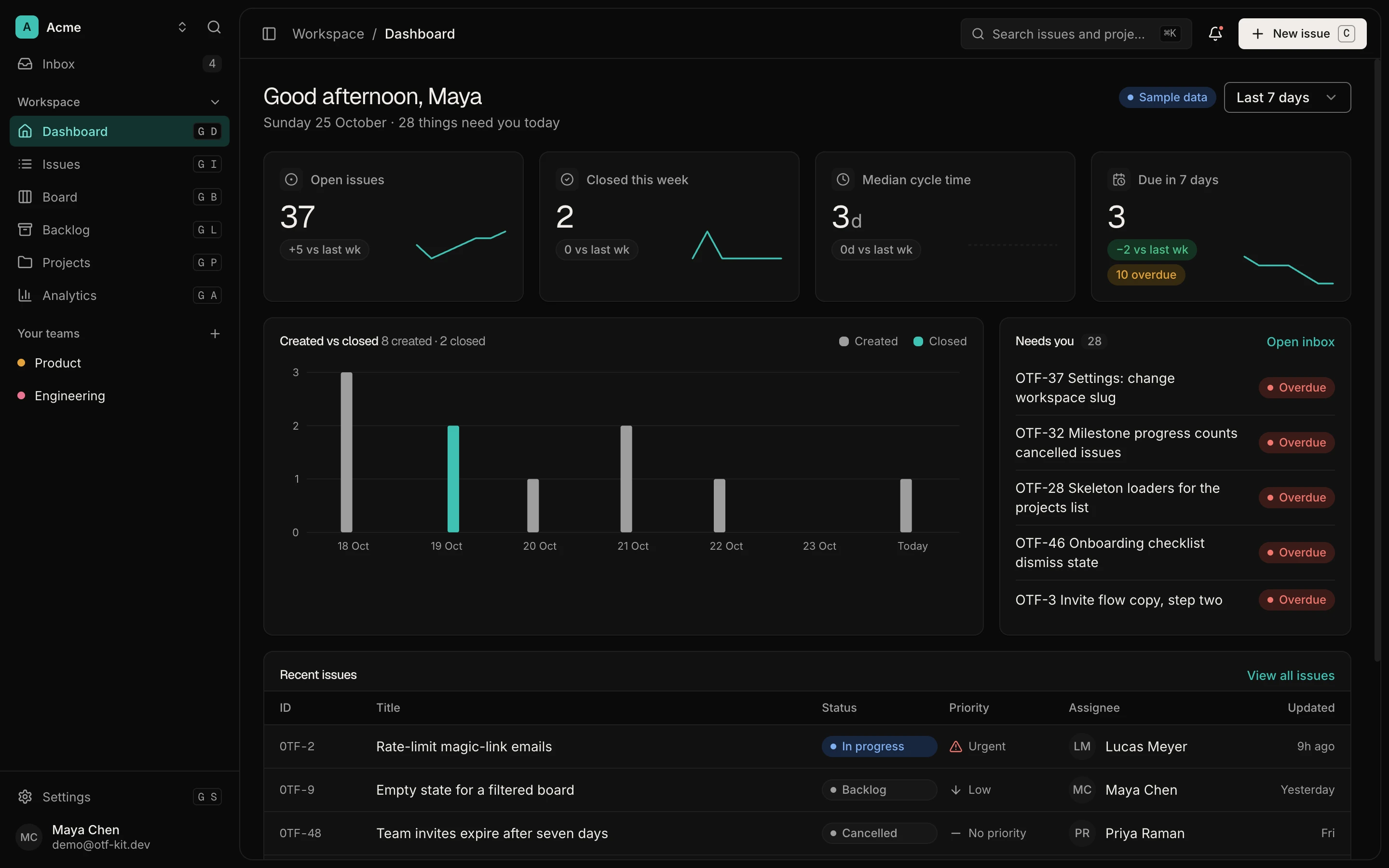
- Screens: landing, auth, dashboard KPIs, issues (list, board, backlog), inbox, analytics, projects, teams, and settings
- Teams: members table plus grid and sheet; the live product page states invite teammates, assign roles, and multi-org switching
- Data plane: Postgres schema, migrations, seed data, and query hooks per entity — including
workspace,team,teamMember,issue,comment,notification, andsavedView - Agent handoff:
CLAUDE.md,.cursorrules, and 20+ task prompts underai/prompts/ - Delivery: commercial source after purchase; deploy script in the kit docs
Purchase path matches other OTF kits: Stripe checkout, license email with a private GitHub invite, then clone and run locally. Templates overview documents accept → invite → clone → install → run → deploy.
Owned admin app versus a rented canvas
Stay on a hosted canvas when the primary object is a disposable ops console, a vendor-hosted UI is acceptable, and those screens do not need to live in Git. Prefer an owned admin app when most of these flip true:
- Employees and operators work in your app, not a shared vendor workspace URL
- Roles, membership, and workspace switching live in schema you can migrate
- Tables are product screens — sort, filter, row actions — not widgets on a host
- Audit history remains queryable after you change agents or hosts
- Maintenance happens in Cursor or Claude Code on disk, with project memory that survives the next tool switch

Canvases remain useful. Many teams keep a rented console for one-off back-office work while the employee admin remains the kit. Buy the kit when roles, tables, and audit belong in a repository you keep — same thesis as booking kit: own availability, confirmations, and the agent loop, applied to ops admin. This how-to assumes you already chose "own the app."
12 production screens. Login and database wired.
The SaaS Dashboard Kit includes login, a database, and a working dashboard. Live demo at saas.otf-kit.dev.
Roles first, then tables, then audit
Anthropic's Claude Code docs state the constraint plainly: each session starts fresh, and project CLAUDE.md files carry persistent architecture, commands, and conventions. OTF's AI tool overview documents the same pattern: every kit ships CLAUDE.md, .cursorrules, and companion agent files so opening the repo does not require re-explaining the stack.
For an admin panel, that handoff starts at roles, not charts. A table without membership is a spreadsheet. The kit already has the seams: email, Google sign-in, and a demo login path with session tables in Postgres; workspace, team, and teamMember rows; Teams at /home/teams; Settings at /home/settings. The live product page's claim to inspect is invite teammates, assign roles, and multi-org switching. Verify that on https://saas.otf-kit.dev before you buy. Do not invent a second permission model in chat.
saas-dashboard/
  src/pages/home/   # dashboard, issues, projects, teams, settings
  src/hooks/        # one query hook per entity
  server/routes/    # /api/* routers
  server/db/        # schema, migrate, seed
  CLAUDE.md
  .cursorrules
  ai/prompts/       # add-entity, add-chart, add-screen recipes
  docs/
  README.md
Treat ai/prompts/ as recipes for bounded jobs — add a member field, add a screen, scaffold an entity — not a license to redesign tenancy from a blank chat. The free SDK at https://github.com/otf-kit/sdk is the shared component layer; the paid kit is the finished admin-capable product plus agent configs that keep the next session honest.
Once roles resolve, operators live in tables. The kit already ships a tasks record table with a detail sheet, a members table on Teams, project list plus create/delete, and saved views. Seed data is deterministic: four users, five projects, fifty issues after bun run db:seed. Extension rule: schema and migration first, route on the server, query hook with optimistic updates, then page plus sidebar item. Paste a prompt from ai/prompts/ ("add an entity", "add a screen"), replace placeholders with your ops object, and review the diff. Do not paste a new grid library beside the existing table.
Rented canvases often advertise activity history as a host feature. That is convenient until you need the log in your own database, under your retention policy, queryable by your agents. Current kit docs do not list a dedicated "audit log" screen. What they do list today: comment rows, notification rows plus inbox, auth session rows, and teamMember rows. If you need a dedicated activity row — actor, action, entity, payload, created_at — add it as an entity: schema → route → hook → page. Audit is a table you can migrate, not a screenshot in a vendor workspace.
Handoff: roles to tables to audit to agents
The loop you own has four steps: roles, tables, audit rows in your database, then agents extending the tree instead of opening a new canvas project.

- Roles — open Teams and Settings. Confirm workspace, members, and the auth session path. Do not add a parallel "admin users" table.
- Tables — extend issues, projects, or a new entity with the add-an-entity recipe. Keep sort, filter, and row actions on the existing pattern.
- Audit — start from comments and notifications. If you need a dedicated activity entity, add it through schema and routes, then show it in the sidebar.
- Agents — every later change starts from
CLAUDE.mdandai/prompts/. The live URL should serve your clone, not a hosted canvas.
A concrete first session after purchase
After you accept the GitHub invite from checkout, the first hour should look boring on purpose. Templates overview documents clone, install, and local run. Kit docs document generate, migrate, and seed before demo data is live. Required env includes DATABASE_URL and Better Auth secrets. Stripe variables are optional, commented entries; product billing is not shipped in the kit.
git clone <your-private-saas-dashboard-repo>
cd <saas-dashboard>
bun install
cp .env.example .env
# fill DATABASE_URL and the required auth secrets (Stripe is optional)
bun run db:generate
bun run db:migrate
bun run db:seed
bun dev
Open the repo in Cursor or Claude Code. Do not start with a blank "rebuild an admin panel from scratch" prompt. Point the agent at the shipped docs:
Read CLAUDE.md and ai/prompts/. Then:
1) Keep roles on workspace / team / teamMember — do not invent a second membership model
2) For a new ops object, follow add-an-entity end-to-end (schema → route → hook → page)
3) Prefer the existing record table and members table over a new grid
4) If we need a dedicated activity log, add it as an entity; do not fake audit in the UI
5) Do not bypass schema → route → hook → page order
That prompt works because the kit already names the hard seams. You are extending an admin-capable product, not interviewing the model about internal-tool builders. When local preview matches — inspect https://saas.otf-kit.dev first if you have not bought yet — follow the README deploy section (bash scripts/deploy-worker.sh for Cloudflare Workers, or the Dockerfile on any container host). Outcome that matters: the live URL serves files from your repository, and the next role or table change is another agent session on the same tree.
What "you actually own" means for ops admin
Ownership here is operational:
- Source of record — members, roles, tables, and activity rows live in Git and Postgres under your org.
- Agent continuity —
CLAUDE.md,.cursorrules, andai/prompts/reload every session. - Pattern ownership — new ops objects follow schema → route → hook → page.
- Commercial rights — one-time kit purchase with commercial source; the Bundle includes saas-dashboard. Confirm limits on https://otf-kit.dev/pricing.
- Tool switching — context in the repo means swapping Cursor for Claude Code does not require rebuilding project memory in a vendor UI.
Compare that to the rented-canvas loop: drag tables onto a host, share an internal URL, then hope export stays enough when the admin must be the product. The kit inverts the order — schema, screens, and prompts arrive first; agents edit second.
saas-dashboard is the analytics and admin product lane — not a $9 landing template, and not the booking or fitness kits. For the builder versus product-repo comparison, read https://otf-kit.dev/blog/otf-vs-retool-appsmith-dashboard. For the demo tour, see https://otf-kit.dev/blog/saas-kit-live-tour. If you already need owned roles, tables, and audit in a repo agents can extend, start on https://otf-kit.dev/templates/saas-dashboard, open the live demo, and buy when the screen set matches.
Sources
- SaaS Dashboard GETTING_STARTED — required env is
DATABASE_URLand auth; Stripe payment vars are commented optional examples, checked 9 October 2026.
SaaS Dashboard Kit product page: https://otf-kit.dev/templates/saas-dashboard
SaaS Dashboard Kit docs: https://otf-kit.dev/docs/templates/saas-dashboard
Templates overview: https://otf-kit.dev/docs/templates/overview
Pricing: https://otf-kit.dev/pricing
AI tool integration: https://otf-kit.dev/docs/ai-tools/overview
Anthropic Claude Code memory: https://docs.anthropic.com/en/docs/claude-code/memory
Related compare: https://otf-kit.dev/blog/otf-vs-retool-appsmith-dashboard
Related live demo tour: https://otf-kit.dev/blog/saas-kit-live-tour
Live demo: https://saas.otf-kit.dev
OTF free SDK: https://github.com/otf-kit/sdk
OTF site: https://otf-kit.dev
Ship the product, not the setup.
- 12 production screens — auth, team, analytics, and settings
- Login and a real database are wired in
- AI configs pre-tuned so your agent extends instead of regenerates
Ship your first screen tonight — free starter in your inbox
The quickstart, the SDK repo and the live kit demos, on this screen and in your inbox.
No spam. Unsubscribe any time.