Fitness kit: screens, schema, and agent prompts after purchase

The Fitness & Wellness Kit ships twelve member-facing screens, five bottom tabs, six app tables (userPublic, dailyGoal, workoutType, workout, award, friendship), and twenty-plus recipes under ai/prompts/ in one $99 monorepo. That is the buyer inventory after checkout — what lands in the private GitHub repo, how the agent docs keep rings and workout types on-pattern, and when to buy this SKU versus scaffolding a blank repo yourself.
This post is that inventory walkthrough. It is not the day-1 build-order guide (workouts, then progress, then profiles as an assembly sequence) — that lives at /blog/how-to-build-a-fitness-app-with-ai. It is not the credit-ladder / rented-versus-owned compare — that decision map is /blog/otf-vs-rork. And it is not an appointments ownership tour; /blog/booking-kit-own-the-repo covers that lane, while this page stays on the fitness SKU inventory.
What the fitness kit actually ships
OTF lists the Fitness & Wellness Kit on https://otf-kit.dev/templates/fitness-kit and in the kit table on https://otf-kit.dev/docs/templates/overview. Standalone price is $99. The kit is also included in the Everything Bundle on https://otf-kit.dev/pricing. Live proof before checkout sits at https://fitness-preview.otf-kit.dev. Kit docs: https://otf-kit.dev/docs/templates/fitness-kit.
Public product claims that matter for buyers:
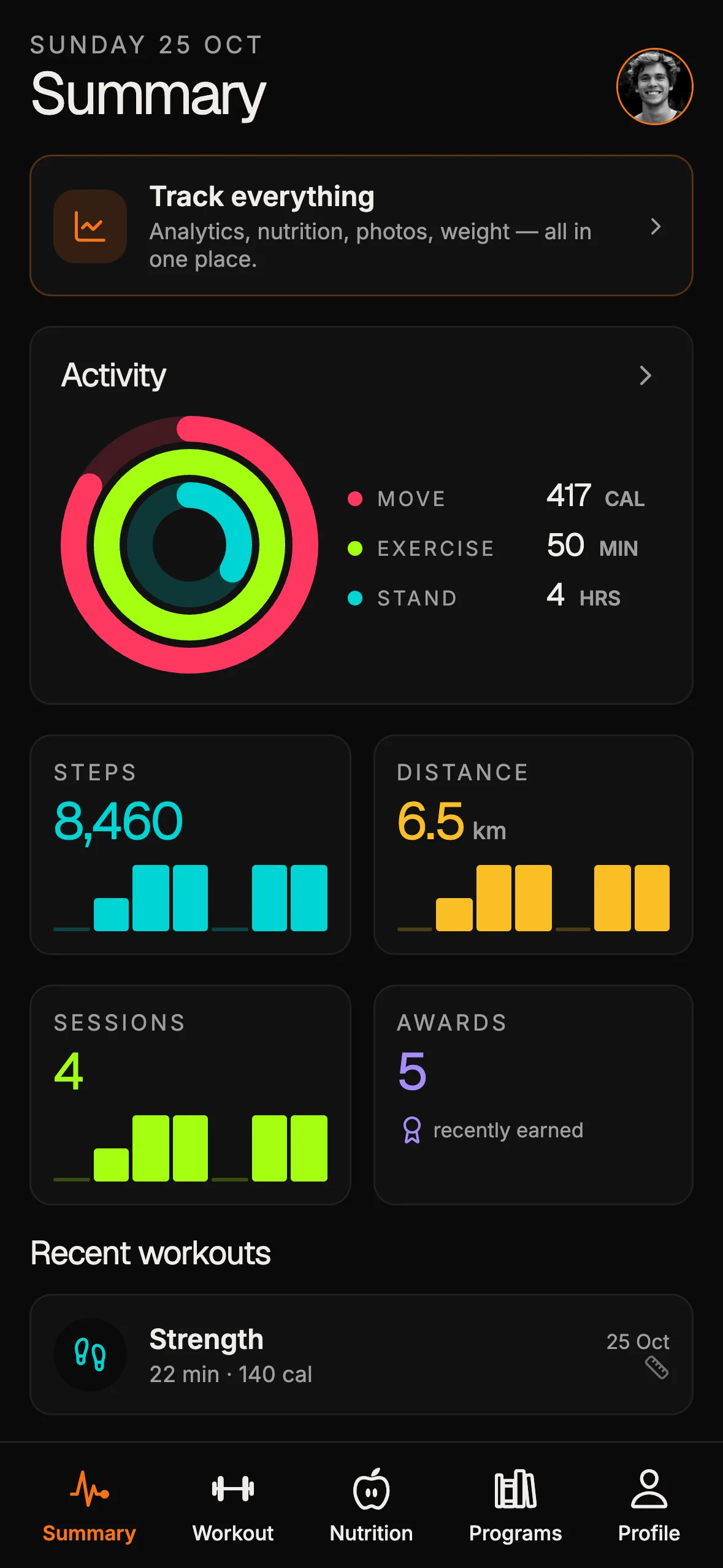
- Twelve screens modelled on a familiar wellness product surface: welcome, login, signup, summary (activity rings hero plus metric grid and recent workouts), ring detail, metric detail, workout list, live start, completed-workout detail, sharing, goal, and profile
- Five bottom tabs: Summary, Workout, Nutrition, Programs, Profile
- Reusable blocks: activity rings, week strip, big stepper, metric card, segmented control, mini bar chart — token-driven, not one-off hex dumps
- Data plane: Better Auth session tables plus six app tables —
userPublic,dailyGoal,workoutType,workout,award,friendship - Stack: Expo SDK 54 + Expo Router + Hono + Postgres + Drizzle + Better Auth. The delivered Fitness kit does not include a Stripe Checkout or payment integration.
- Delivery: one product tree for phone and web; commercial source after purchase; web deploy script; native binaries via included EAS build profiles
- Agent handoff:
CLAUDE.md,.cursorrules, companion agent files, and 20+ task prompts underai/prompts/(includingadd-workout-typeandchange-ring-targets)
Purchase path matches other OTF kits: Stripe checkout, license email with a private GitHub invite, then clone and run locally. Templates overview documents that pattern — accept the invite, clone, install, run, deploy with included ship scripts when ready (https://otf-kit.dev/docs/templates/overview).
The free component layer those screens sit on is https://github.com/otf-kit/sdk. The paid kit is the finished fitness product plus the agent configs that keep the next session honest.
When to buy versus blank-repo scaffold
Stay on a blank scaffold or a disposable preview when the primary object is a throwaway spike, a vendor-hosted project is acceptable for this quarter, and you are not yet ready to keep workouts and goals in schema you migrate. Prefer the fitness kit when most of these flip true:
- Members log workouts, see rings and trends, and edit goals or profiles inside your app
- Workout types, daily goals, awards, and friendships live in tables you can migrate
- Rings and metric detail are product screens, not widgets parked on a host
- You ship phone and web from one monorepo you keep editing
- Maintenance happens in Cursor or Claude Code on disk, with project memory versioned beside the code
- The live URL should serve your clone, not a chat project that resets continuity every billing cycle
Sandboxes and blank scaffolds remain useful. Many teams keep a hosted preview for a weekend spike while the member-facing fitness product remains the kit. Buy the kit when workouts, progress, schema, and the agent loop belong in a repository you keep — screens and tables already named, prompts already tested, so the first agent session extends the product instead of inventing the domain.

One codebase. iOS, Android, and web.
The Fitness Kit is a mobile starter with its own API, with sign-in and a database. Live demo at fitness-preview.otf-kit.dev.
Agent docs as the handoff layer inside the kit
Anthropic's Claude Code memory docs state the constraint plainly: each session starts with a fresh context window, and project CLAUDE.md files are how you give the agent persistent architecture, commands, and conventions (https://docs.anthropic.com/en/docs/claude-code/memory). OTF's AI tool overview documents the same pattern across kits: every kit ships CLAUDE.md, .cursorrules, AGENTS.md, and (where applicable) companion files so opening the repo does not require re-explaining the stack (https://otf-kit.dev/docs/ai-tools/overview).
For fitness-kit, that handoff is load-bearing. Workout types, ring targets, goals, and profile stats are easy for an agent to break if it invents a second source of truth. The shipped docs keep edits on-pattern:
fitness-kit/
  app/                 # Summary, workout, nutrition, programs, profile, auth
  hooks/               # Workouts, types, trends, awards — product reads
  server/              # Privileged API routes
  server/db/           # Schema, migrate, seed
  CLAUDE.md            # Stack map, conventions, how to extend flows
  .cursorrules         # Cursor-facing mirror of the same rules
  AGENTS.md            # Universal agent notes when present
  ai/prompts/          # Bounded recipes: add workout type, change ring targets
  scripts/             # Deploy and ship helpers
  README.md            # Setup, env, local boot, deploy
Treat ai/prompts/ as recipes for bounded jobs — add a workout type, swap ring colors through theme tokens, add a screen or entity where the kit already patterns it — not as a license to redesign the domain from a blank chat. Changelog notes for the kit call out twenty-one AI prompts in that library and a design checklist that keeps padding and tokens honest; use those as guardrails, not as decoration.
The monorepo shape matters for agents as much as for humans. Shared tokens and UI blocks travel with the app package. Phone and web stay one product story. When an agent opens the tree on Monday, it should read the same conventions it saw last Friday — not re-interview you about whether rings live on Summary or on a throwaway chart component.
Workouts, rings, and goals in the shipped tree — then ship
The product loop after purchase has four steps: agent docs load first, then you extend workouts and types, progress (rings, goals, metrics) stays on the existing blocks and tables, and ship leaves the live URL pointing at your repository.
Concrete shape, matching storefront and kit docs:
- Workouts — list, live start, and completed detail stay on
workoutTypeandworkout. Type chips and seed data are already there after migrate and seed. Do not invent a parallel log in chat. - Progress — Summary rings, week strip, ring detail, day/week/month/year metric detail, and the big stepper for daily move goals stay on
dailyGoal, workouts, and tokenized ring colors. Extension prefers named recipes such aschange-ring-targetsover scattering new colors across twenty files. - Profiles and sharing — Profile tab plus awards and friends activity on
userPublic,award, andfriendship. Kit docs are honest that some social feed pieces start as demo-shaped; real push and deep social graphs are product work you add on purpose, not something an agent should fake only in the UI. - Ship — web export and native build profiles share the same tree. Kit docs document a deploy script for the static web demo (
bash scripts/deploy-worker.sh, Cloudflare Workers), a Dockerfile for any container host, and EAS profiles for iOS and Android binaries. Preview before buy: scan the Expo Go QR on https://fitness-preview.otf-kit.dev when you want the native channel on your own phone.
UI can change under an agent. The hard seams — schema order, route boundaries, and ring colors on theme tokens — should not. If an agent wants to "simplify" by bypassing schema → route → hook → screen, point it back at CLAUDE.md before any polish.

A concrete first session after purchase
After you accept the GitHub invite from checkout, the first hour should look boring on purpose. Templates overview documents clone, install, and local run. Kit docs document generate, migrate, and seed before demo data is live. Required env includes DATABASE_URL plus the documented auth secrets on https://otf-kit.dev/docs/templates/fitness-kit. Google OAuth is optional for local demo setup; the kit does not read Stripe credentials or include a payment flow.
git clone <your-private-fitness-kit-repo>
cd <fitness-kit>
bun install
cp .env.example .env
# fill DATABASE_URL and the documented auth secrets
docker compose up postgres -d
bun run db:generate
bun run db:migrate
bun run db:seed
bun dev
Open the repo in Cursor or Claude Code. Do not start with a blank "rebuild a fitness app from scratch" prompt. Point the agent at the shipped docs:
Read CLAUDE.md and ai/prompts/. Then:
1) Keep workouts on workoutType + workout — do not invent a second log
2) For a new type, use add-workout-type (seed row, then chips)
3) Keep rings and goals on theme tokens and dailyGoal
4) Prefer existing screens over inventing a parallel fitness flow
5) Do not bypass schema → route → hook → screen order
That prompt works because the kit already names the hard seams. You are extending a fitness product, not interviewing the model about wellness information architecture. When local preview matches — inspect https://fitness-preview.otf-kit.dev first if you have not bought yet — follow the README deploy section. The outcome that matters: the live URL serves files from your repository, and the next workout type or goal change is another agent session on the same tree.
For the assembly sequence after you already chose the kit — workouts, then progress, then profiles, then agents — use /blog/how-to-build-a-fitness-app-with-ai. This post stops at the SKU inventory and post-purchase handoff; that sibling walks the day-1 product spine.
What the buyer repo gives you operationally
After purchase, the operational contract looks like this:
- Source of record — workout types, logs, goals, awards, and friendships live in Git and Postgres under your org, not as side effects of a hosted chat project.
- Agent continuity —
CLAUDE.mdand companion files reload every session, so Cursor and Claude Code reopen the same conventions after a weekend. - Invariant ownership — new features follow schema → route → hook → screen. Ring colors stay on theme tokens. If you add a payment provider later, keep its confirmation behind a privileged server-side flow; that integration is not part of this kit.
- Commercial rights — the individual kit SKU is a one-time purchase with commercial source; the Bundle includes fitness-kit with the rest of the lineup. Confirm seat and client limits on https://otf-kit.dev/pricing before you scale a studio workflow.
- Tool switching — because context is in the repo, swapping Cursor for Claude Code (or the reverse) does not require rebuilding project memory in a new vendor UI.
- Host and store choice — web ships to hosts you control; native binaries use build profiles you keep. Preview channels and store submit stay scripts in your tree, not only a builder's publish button.
Compare that to starting from a blank repo or a rented preview: you still prompt a workout UI, but you also invent the schema, the ring tokens, the agent house style, and the deploy path. Export from a sandbox can move files. It does not automatically move a durable agent house style or a product-shaped data model. The kit inverts the order: house style, schema, and screens arrive first; agents edit second.
If you still need the rented-builder versus buyer-repo decision as a comparison, read /blog/otf-vs-rork once — that is the compare post; this one stays on the fitness SKU inventory.
How this fits the rest of OTF without confusing the SKU
Fitness-kit is the wellness product lane — not a $9 landing template, and not the booking or saas-dashboard kits. Landing templates remain the marketing-site lane for waitlist and launch pages. Booking-kit remains the appointment product lane. Full-stack kits are the $99 product lane when you need authentication, data, and phone or web clients. The Fitness kit does not include app billing or payment processing. Inspect the live fitness preview, buy when the member path matches, keep editing with the agent you already use.
If you already own the tree and need the day-1 assembly order, read /blog/how-to-build-a-fitness-app-with-ai. If you already know you need the fitness screens, schema, and agent prompts in one tree — workouts, rings, goals, profiles, and the agent loop — start on https://otf-kit.dev/templates/fitness-kit, open the live preview, and buy when the screen set matches.
Sources
Fitness & Wellness Kit product page: https://otf-kit.dev/templates/fitness-kit
Fitness kit docs (stack, screens, blocks, env, deploy): https://otf-kit.dev/docs/templates/fitness-kit
Templates catalog: https://otf-kit.dev/templates
Templates overview (purchase → invite → clone → deploy): https://otf-kit.dev/docs/templates/overview
Pricing: https://otf-kit.dev/pricing
AI tool integration (CLAUDE.md, .cursorrules, AGENTS.md, companion files): https://otf-kit.dev/docs/ai-tools/overview
OTF SDK (shared component layer): https://github.com/otf-kit/sdk
OTF site: https://otf-kit.dev
Live fitness preview: https://fitness-preview.otf-kit.dev
Anthropic Claude Code memory: https://docs.anthropic.com/en/docs/claude-code/memory
Related: /blog/how-to-build-a-fitness-app-with-ai, /blog/otf-vs-rork, /blog/booking-kit-own-the-repo
Stop wiring. Start shipping.
- Sign-in and a database wired in, with its own API
- iOS + Android + web from one codebase
- AI configs pre-tuned + 20+ task prompts per kit included
Ship your first screen tonight — free starter in your inbox
The quickstart, the SDK repo and the live kit demos, on this screen and in your inbox.
No spam. Unsubscribe any time.