How to build a SaaS app with AI from a day-1 owned monorepo

Coding agents are excellent at extending a repository they can read. The hard part of building a SaaS app with AI is not the next prompt — it is what exists on day 1. If day 1 is only a blank chat or a rented preview, every later session must establish its authentication, data model, and product-specific billing. Starting from the owned SaaS Dashboard monorepo gives you authentication and schema foundations; product billing is the first customer-facing surface you add.
This post is a how-to for that build order: own the monorepo first, use its day-one authentication and schema foundations, add billing as the first customer-facing product surface, then use agents to extend that spine. Catalog lane: saas → saas-dashboard. It is not the stay-in-the-IDE SaaS prompt loop, not the live demo tour, and not the Retool / Appsmith vs product-repo contrast. Those posts exist. It is also not the admin panel or analytics dashboard how-tos — those order domain screens. This one orders the SaaS product spine.
Day 1 means an owned monorepo, not a prompt transcript
A SaaS product is a durable repository: client, API, database migrations, env contracts, deploy script, and agent config living together under one git root you control. Day 1 ownership means you can clone, run locally, review diffs, and ship under your domain without asking a generator host to export later.
OTF's SaaS Dashboard kit is listed on https://otf-kit.dev/templates/saas-dashboard and in the kits table on https://otf-kit.dev/docs/templates/overview. Standalone price is $99; also in the Everything Bundle on https://otf-kit.dev/pricing. Live proof before checkout: https://saas.otf-kit.dev. Purchase path: Stripe checkout, license email with a private GitHub invite, git clone, install, bun dev, then the kit deploy script when you are ready.
Public product claims that matter for day-1 ownership:
- Full-stack scaffold in one repo (frontend + backend)
- Email/password sign-in; Google sign-in is optional when its keys are configured
- Postgres with schema, migrations, and seed data
- Product billing is not included in the SaaS Dashboard kit; its customization guide documents how to add Checkout and a webhook. OTF's own checkout and license email are for buying the kit, not app billing.
- Agent handoff files:
CLAUDE.md,.cursorrules,AGENTS.md, plus 20+ task prompts underai/prompts/ - Docs for getting started, architecture, customisation, and deployment
The MIT SDK kits consume is public at https://github.com/otf-kit/sdk. Kits are commercial source after purchase; the SDK is the shared component layer.
Treat day 1 as "the product repository exists and runs." Do not treat day 1 as "I described a SaaS in chat and got a preview."
Auth and schema on day 1; billing is the first surface to add
Plumbing framing asks how long until login, checkout, and tables work. Product-outcome framing separates what the kit provides from what your product still needs:
- Auth outcome: Can a customer create an account, sign in, join an org, and land in a branded session you control?
- Billing to add: Which plans, checkout flow, webhook, and entitlements does your product need after you extend the kit?
- Schema outcome: Does the database already encode the product's nouns (workspace, team, member, issue, notification) so features map to rows instead of ad-hoc JSON?
Authentication and schema give agents a coherent starting point; billing becomes a customer-facing outcome only after you implement it. Agents can then extend the repo with invite flows, plan limits, and new entities rather than inventing its foundations each sprint.
This is adjacent to, but not the same as, the weeks-saved thesis in auth and billing you don't hand-roll. That post argues undifferentiated setup is expensive. This post argues the day-1 monorepo should provide authentication and schema foundations, then give you an owned place to add billing as the first product surface your AI coding tools extend.

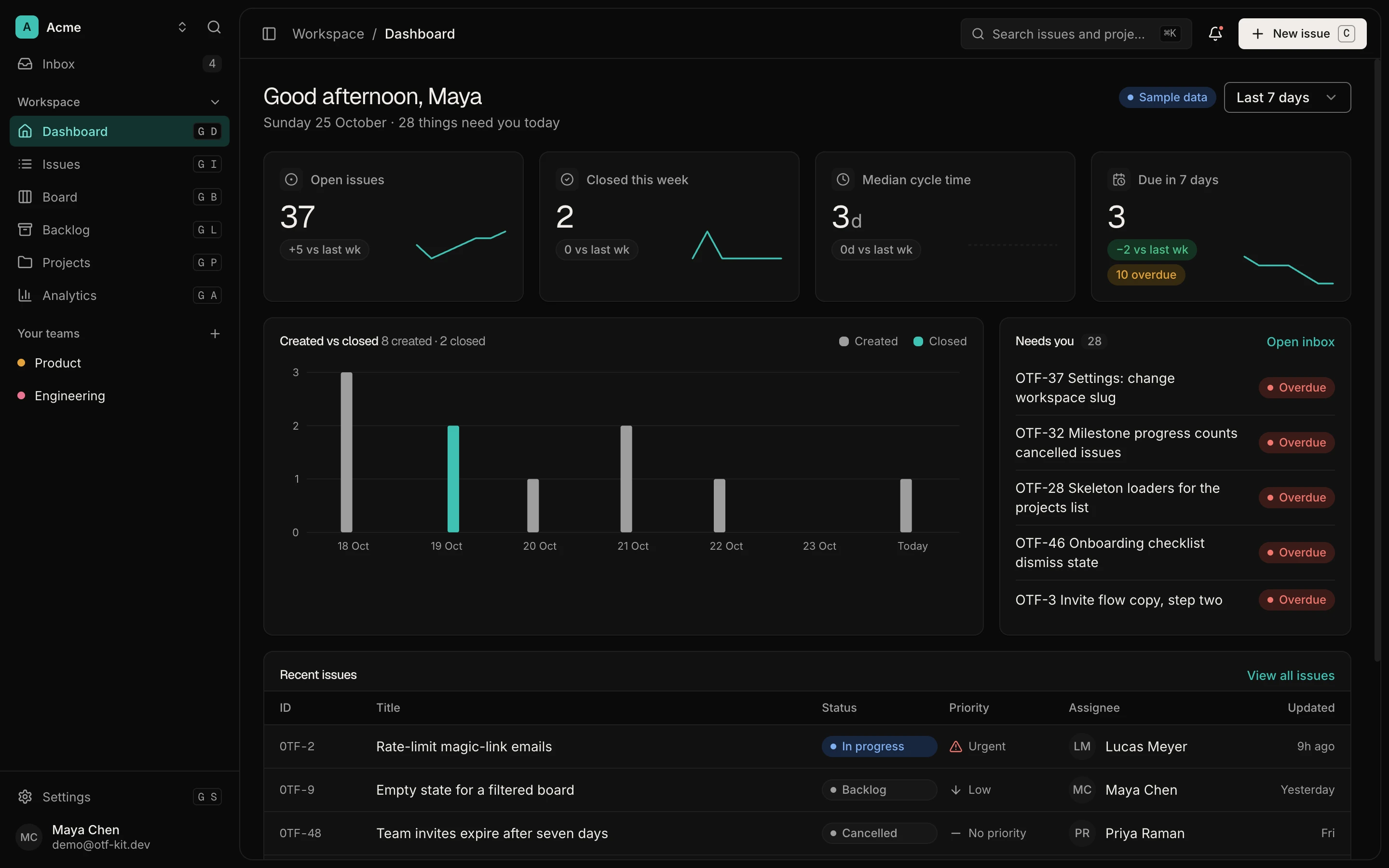
12 production screens. Login and database wired.
The SaaS Dashboard Kit includes login, a database, and a working dashboard. Live demo at saas.otf-kit.dev.
Auth as a product outcome
Auth is not "add a provider." Auth is the first product screen customers trust: sign-up, sign-in, session continuity, org membership, and logout that matches your brand and domain.
On day 1 of an owned saas-dashboard monorepo, the outcome you verify is concrete:
- Sign-up creates a user row and a session.
- Sign-in restores that session without a second product.
- Org / team membership resolves which workspace the dashboard loads.
- Protected API routes reject unauthenticated calls the same way the UI does.
Write the product contract before you ask an agent to "improve auth":
type AuthProductOutcome = {
  userId: string
  orgId: string
  role: "owner" | "admin" | "member"
  sessionValid: boolean
}

function canEnterDashboard(session: AuthProductOutcome): boolean {
  return session.sessionValid && Boolean(session.orgId)
}
When Cursor or Claude Code extends auth, point them at that contract plus the kit's existing auth routes and agent docs. Ask for a named product change ("add invite-by-email that creates a teamMember row") — not "wire login from scratch."
Billing is the first product surface to add
Billing is not a checkout button. Billing is the paid relationship: plan selected, payment verified, entitlement granted, access revoked when the subscription is no longer good.
Stripe's own subscription overview is explicit that subscriptions move through statuses (trialing, active, past_due, canceled, and related states) and that you should provision access when the subscription is in good standing, using webhooks and entitlements rather than trusting the browser (Stripe subscriptions overview). For an AI-built SaaS, that means your monorepo owns the product gate; the provider owns card storage and retry collection.
Billing implementation checklist:
- Checkout starts on the server with your price IDs.
- A signed webhook updates local subscription state.
- Feature gates read local state (or provider entitlements), never a client-only flag.
- Cancel / past-due paths degrade access in the product UI you own.
Keep a small entitlement map in the repo so agents extend plans without inventing payment logic:
type PlanId = "starter" | "growth"

type Entitlement = {
  planId: PlanId
  maxSeats: number
  canUseAnalytics: boolean
}

const ENTITLEMENTS: Record<PlanId, Entitlement> = {
  starter: { planId: "starter", maxSeats: 3, canUseAnalytics: false },
  growth: { planId: "growth", maxSeats: 25, canUseAnalytics: true },
}

function allowFeature(
  planId: PlanId,
  feature: keyof Omit<Entitlement, "planId" | "maxSeats">,
): boolean {
  return Boolean(ENTITLEMENTS[planId][feature])
}
Ask agents to add a plan field or a gate — not to redesign card handling. Deeper payment lifecycle detail lives in payments you don't hand-roll. Here the point is to make paid access a deliberate product surface you implement in the owned repo.
Schema as a product outcome
Schema is the product's vocabulary. If day 1 has no migrations and seed data, every AI session invents table shapes. If day 1 already has workspace, team, member, issue, comment, notification, and related entities (as the saas-dashboard kit documents), agents add columns and relations against a known contract.
Product-outcome test for schema:
- Can you explain the app in the nouns the database already uses?
- Does seed data let you click a realistic workspace on first run?
- Do query hooks / API routes sit beside the tables they own?
When you prompt an agent, name the entity and the migration boundary:
# Example agent ask (shape, not a required filename)
# "Add a `savedView` filter field used by the issues list.
#  Migration + API + UI. Do not invent a second issues table."
Schema-as-outcome keeps the monorepo coherent. Schema-as-afterthought is how AI-coded SaaS projects feel disposable — the same failure mode described in why AI-coded projects feel disposable.

How AI agents should extend the spine (without turning this into an IDE-loop post)
With authentication and schema in place, the agent job is incremental product work; billing can be the first customer-facing surface you add:
- Read
CLAUDE.md/.cursorrules/ai/prompts/so the kit conventions are load-bearing. - Change one outcome surface at a time (invite flow, plan gate, new entity).
- Review the diff in git; run the app; keep the migration with the feature.
That is complementary to the in-IDE loop essay — this post stops at the precondition. Without day-1 outcomes, the loop regenerates plumbing; with them, it ships product.
UI pieces can come from the public SDK (@otfdashkit/ui, @otfdashkit/tokens) at https://github.com/otf-kit/sdk. The kit remains the product repo.
A concrete day-1 sequence after you own the repo
- Accept the GitHub invite, clone, install, run the local dev command from the kit docs.
- Walk auth as a customer: sign up, sign in, confirm org context loads the dashboard.
- Open the schema: skim migrations and seed; map three product nouns to tables.
- Add billing by following the kit's customization guide; then test Checkout, webhook updates, and a gated screen against your own product requirements.
- Write one agent prompt that extends a single outcome (example: seat limit copy on the teams page tied to
maxSeats). - Commit the diff; deploy with the kit script when you want a public URL.
If any step fails, fix that outcome before asking for feature theater. A SaaS app with AI fails when prompts outrun the spine.
What "you actually own" means for a SaaS build
Ownership is not a slogan on a marketing page. It means:
- Source under your GitHub account after purchase
- Auth sessions and org data in your database
- Product billing state in the repo and database after you implement the integration
- Schema migrations in git history next to the features they enable
- Agent configs that travel with the repo when teammates clone it
Compare that to a chat preview or internal-tools host: screens may arrive faster, while authentication, billing behavior, and schema remain outside the repo you control.
Build the SaaS app with AI from an owned monorepo on day 1: start with authentication and schema, add billing as your first customer-facing surface using the kit's customization guide, then let agents extend that spine.
Browse the kit and try the live demo from https://otf-kit.dev/templates/saas-dashboard when you want the commercial path; the SDK remains free at https://github.com/otf-kit/sdk.
Sources
- OTF SaaS Dashboard kit
- OTF templates overview
- OTF site
- otf-kit/sdk on GitHub
- Stripe: How subscriptions work
- OTF live SaaS demo
Ship the product, not the setup.
- 12 production screens — auth, team, analytics, and settings
- Login and a real database are wired in
- AI configs pre-tuned so your agent extends instead of regenerates
Ship your first screen tonight — free starter in your inbox
The quickstart, the SDK repo and the live kit demos, on this screen and in your inbox.
No spam. Unsubscribe any time.