Vercel Sandbox storage is now 64 GB: size agent workspaces for large repos

Vercel Sandbox storage is now 64 GB per sandbox, up from 32 GB. If you run coding agents, long tool loops, or OpenAI Agents sessions on Vercel, that change is not a changelog footnote — it changes how you size repositories, dependency caches, and disk-spilling workloads inside an isolated session.
The upgrade applies to sandboxes created from a Vercel Managed Image or a custom image, and to sandboxes still configured with the deprecated runtime property. Primary source: the 11 September 2026 Vercel changelog entry.

What changed, in builder terms
Every Vercel Sandbox now includes 64 GB of storage by default on the latest SDK and CLI versions and when created with an image. Vercel’s own framing is practical: more room for large repositories, dependencies, build artifacts, data workloads that spill to disk, and storage-intensive agent tasks.
That is the ICP bar. Builders shipping production agents on Vercel should update planning assumptions:
- A monorepo checkout plus
node_modulesor language toolchains is less likely to blow the old 32 GB ceiling mid-session. - Agent tasks that write intermediate datasets to disk have more headroom before you redesign the pipeline to stream everything.
- Custom images that bake toolchains still leave more writable space for the session itself.
It does not remove the need to own the hosting seam. Sandbox is still an execution environment you configure; your app still owns queues, auth, and how agent results land in your product.
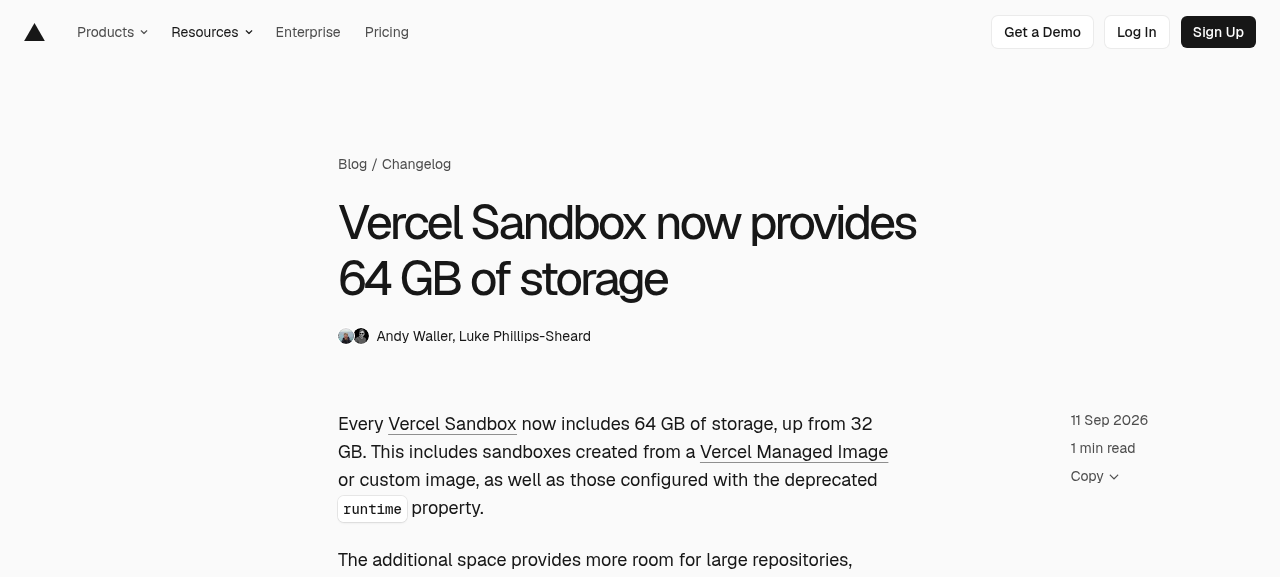
Public changelog at https://vercel.com/changelog/vercel-sandbox-64-gb-storage (captured 2026-09-15).
How this fits the agent hosting stack
If you already wire OpenAI Agents API sessions through Vercel Queues and Sandbox, treat storage as one more explicit budget next to region and image choice. The companion post OpenAI Agents on Vercel covers the Queue and Sandbox hosting seam; this post is only about the disk ceiling moving.
Sandbox images remain the other half of the decision. Vercel’s images docs describe Managed Images such as vercel/sandbox/universal:latest (default when you omit image) and custom images pushed to Vercel Container Registry. Larger storage does not replace pinning an image digest or baking system packages into the image so every session does not reinstall the world.
import { Sandbox } from "@vercel/sandbox";

// Prefer an explicit image when agent sessions need a stable toolchain.
const sandbox = await Sandbox.create({
  image: "vercel/sandbox/universal:latest",
  // region / failover belong in the same create call when latency matters
});

try {
  // Agent work that may write large checkouts or build artifacts
  await sandbox.runCommand("bash", ["-lc", "df -h"]);
} finally {
  await sandbox.stop();
}
Use that as a smoke check after you bump SDK/CLI versions: confirm the sandbox you create is on the new default storage class your team expects, and that df matches the planning number you put in runbooks.

12 production screens. Login and database wired.
The SaaS Dashboard Kit includes login, a database, and a working dashboard. Live demo at saas.otf-kit.dev.
What you should do this week
- Bump
@vercel/sandboxand the Vercel CLI to versions that include the 64 GB default for image-created sandboxes. - Re-read disk budgets in agent runbooks — update any “keep under 32 GB” checks, alerts, or session abort rules.
- Separate image contents from session writes — bake toolchains into Managed or custom images; leave the larger writable volume for checkouts and artifacts.
- Retest one storage-heavy path — large monorepo clone, dependency install, and a build that spills intermediates to disk.
- Keep product ownership outside the sandbox — auth, billing, and durable product state stay in your repo and services, not only in an ephemeral agent workspace.
For native subscription auth on the AI SDK harness layer (credentials at the host boundary), see AI SDK harness auth. For production observe loops on mobile builds, EAS Observe in production is a different observability lane — do not conflate sandbox disk with release health.

Limits of the announcement
The changelog is one minute of reading for a reason. It does not change pricing in the text we verified, and it does not claim unlimited disk. It also does not replace region selection, failover configuration, or image readiness states (Ready / Preparing / Unoptimized) documented for custom images.
If your failure mode was “sandbox disk full during agent install,” raise the budget and retest. If your failure mode was “agent regenerated the product instead of extending owned modules,” storage will not fix that — you still need an owned kit spine and acceptance checks.
Builder checklist
Before you close the ticket:
- Did we upgrade SDK/CLI so new sandboxes actually get 64 GB?
- Which agent jobs previously failed near 32 GB, and did they pass after the bump?
- Are large toolchains in the image, or still downloading into session storage every run?
- Where do durable product writes go when the sandbox stops?
Failure modes the extra disk actually fixes
Teams usually hit Sandbox disk in one of three patterns:
- Checkout plus install — cloning a large monorepo and installing JavaScript or Python dependencies fills the volume before the agent starts the real task.
- Build intermediates — compilers, bundlers, or test runners write caches and artifacts that were fine on a developer laptop and fatal in a 32 GB sandbox.
- Agent scratch — tool-using agents download datasets, unzip archives, or keep multiple worktrees for parallel attempts.
Moving to 64 GB does not mean you should ignore those patterns. It means you can stop failing the happy path while you still enforce cleanup for pathological jobs. Keep a post-session cleanup command in the agent brief when jobs create large temporary trees.
Pair storage with image strategy
Writable storage and image contents trade off. If every session installs system packages with apt-get, you burn time and disk even with 64 GB. Prefer:
- A Managed Image that already includes the language toolchain you need.
- A custom image in Vercel Container Registry when you need private CLIs or pinned OS packages.
- Digest pins for production agent fleets so nightly Managed Image rolls do not surprise you mid-incident.
The images documentation is explicit that Sandbox does not run Docker ENTRYPOINT or CMD for custom images — you start processes with sandbox.runCommand() after create. That keeps your agent harness in control of startup, which is what you want for reproducible acceptance checks.
Example acceptance checks for a storage-sensitive agent
Add these to the PR or agent brief so Cursor or Claude Code cannot mark the job done early:
# After Sandbox.create on the upgraded SDK/CLI
df -BG / | awk 'NR==2 {print $2}'   # expect planning number near 64G class
du -sh . node_modules dist 2>/dev/null || true
Then assert product-side outcomes outside the sandbox: webhook processed, artifact uploaded to your bucket, or PR opened against the owned repo. Disk headroom is necessary; it is not the definition of done.
Relation to other recent Vercel agent notes
Sandbox region availability and routing improvements change latency. Native harness subscription auth changes where credentials live. The 64 GB change changes capacity. Keep them separate in your runbook so on-call does not mix “disk full” with “wrong region” or “token missing on host.”
If you are still deciding whether sandboxed generation is enough for a product, sandboxed vs filesystem agents is the broader ownership thesis. This post assumes you already chose Sandbox as an execution backend and need the new capacity number.
Sources
- Vercel Sandbox now provides 64 GB of storage — 32 GB to 64 GB default; applies to Managed Image, custom image, and deprecated runtime property sandboxes; intended uses (large repos, dependencies, build artifacts, disk-spilling data, storage-intensive agent tasks) (fetched 2026-09-15).
- Vercel Sandbox images — Managed Images, custom images,
Sandbox.create({ image }), readiness states (fetched 2026-09-15).

Ship the product, not the setup.
- 12 production screens — auth, team, analytics, and settings
- Login and a real database are wired in
- AI configs pre-tuned so your agent extends instead of regenerates
Ship your first screen tonight — free starter in your inbox
The quickstart, the SDK repo and the live kit demos, on this screen and in your inbox.
No spam. Unsubscribe any time.