Fitness kit: finish every live workout as one owned row, not a ghost timer

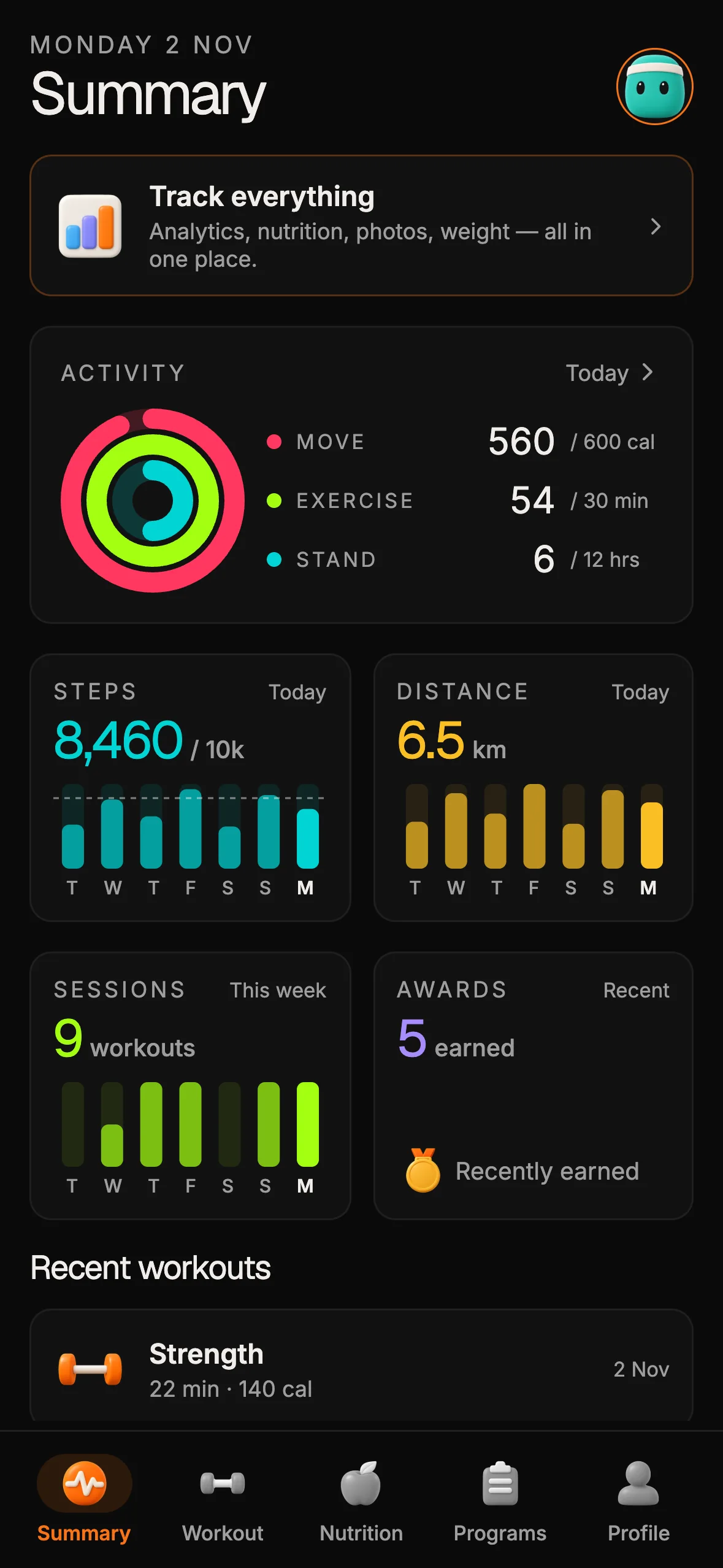
The Fitness & Wellness Kit ships a live workout loop you can open today: pick a type, start a session with a timer and calorie/distance counters, tap End, and read the completed summary on a detail screen. That loop only helps production members if End writes one honest row into your owned workout table — not a ghost timer that evaporates when the process dies, and not a second log an agent invents beside the schema.
This post is that write-path invariant. It is not the SKU inventory after checkout — that lives at /blog/fitness-kit-after-purchase. It is not the day-1 assembly order for greenfield builders — that is /blog/how-to-build-a-fitness-app-with-ai. It is not the iOS/Android/web export thesis — that is /blog/one-codebase-three-platforms. And it is not the rented-builder compare — that decision map is /blog/otf-vs-rork.
What the kit already names for live workouts
OTF lists the Fitness & Wellness Kit on https://otf-kit.dev/templates/fitness-kit and documents the screens and schema on https://otf-kit.dev/docs/templates/fitness-kit. Standalone price is $99; the kit is also in the Everything Bundle on https://otf-kit.dev/pricing. Live proof before buy sits at https://fitness-preview.otf-kit.dev.
Kit docs name the workout surface explicitly:
- Workout tab: type chips, Start CTA, recent log
- Workout start: live timer, calorie/distance counters, End CTA
- Workout detail: completed-workout summary plus delete
- App tables that own the domain:
workoutTypeandworkout(alongsideuserPublic,dailyGoal,award,friendship) - Agent handoff:
CLAUDE.md,.cursorrules, and recipes underai/prompts/— including bounded jobs such asadd-workout-type
That is the product spine. The kit does not claim TaskManager-backed GPS or OEM-kill recovery as a shipped module. Those are extension problems you own when your product needs continuous background distance. For the default loop, the invariant is simpler: a started session must end as exactly one workout row members can reopen, share, or delete — never a timer that only lived in RAM.
Why ghost timers fail members (and agents)
Three failure modes show up the week after you buy:
- Abandon without End — the member backgrounds the phone mid-session, the JS timer dies with the process, and Summary never learns a workout happened.
- Double write on End — a retry, a flaky network, or an agent "helpfully" posting twice inserts two rows for one session.
- Parallel log invent — an agent prompted with "add workout history" creates a second store beside
workout, then rings, awards, and recent lists diverge.
The Expo engineering post How to build a resilient activity tracker with Expo spells out the mobile reality behind (1): session state in memory dies when the OS suspends or kills the process; recovery needs persistence outside the component tree, monotonic merges so two writers cannot lower totals, and a recovery path that does not discard progress just because the network was down. Use that post when you extend beyond an in-app timer. Do not pretend the kit already shipped Calda's full GPS pipeline — it did not. The kit gave you the screens and tables; you keep the write contract honest.


One codebase. iOS, Android, and web.
The Fitness Kit is a mobile starter with its own API, with sign-in and a database. Live demo at fitness-preview.otf-kit.dev.
The owned write contract: open → tick → end → one row
Treat the live session as a state machine with one durable outcome:
- Open — member picks a
workoutTypechip and hits Start. Create an in-progress session id in local durable storage (or a pending row if you choose server-first). Do not wait until End to allocate identity. - Tick — timer and counters update the session snapshot. Prefer wall-clock elapsed from a startedAt timestamp over a pure setInterval count that freezes when the JS thread sleeps.
- End — privileged path inserts or finalizes exactly one
workoutrow keyed by session id: type, duration, calories/distance you choose to store, completedAt. Idempotent: a second End with the same session id updates or no-ops; it never inserts a twin. - Detail — Workout detail and recent log read that row. Delete removes it on purpose. Summary rings and trends derive from completed rows, not from ephemeral timers.
Illustrative shape (labeled sketch — not a private kit file dump):
// Illustrative session finalize — YOUR-PRODUCTION-DOMAIN API
type LiveSession = {
  sessionId: string;
  workoutTypeId: string;
  startedAt: string; // ISO
  calories?: number;
  distanceMeters?: number;
};

async function endWorkout(session: LiveSession) {
  const endedAt = new Date().toISOString();
  const durationSec = Math.max(
    0,
    Math.floor(
      (Date.parse(endedAt) - Date.parse(session.startedAt)) / 1000
    )
  );

  // Idempotent upsert on sessionId — never INSERT a second row for the same session
  await api.post("/workouts/finalize", {
    sessionId: session.sessionId,
    workoutTypeId: session.workoutTypeId,
    startedAt: session.startedAt,
    endedAt,
    durationSec,
    calories: session.calories ?? null,
    distanceMeters: session.distanceMeters ?? null,
  });
}
Keep calories and distance honest to what you actually measured. If the kit UI shows counters for demo pacing, do not invent GPS provenance you did not collect. When you later add background location, integrate with the same session id and the same finalize path — do not fork a "GPS workouts" table.
Keep workoutType as the only type catalog agents extend
Live sessions are only as trustworthy as the type chips. Kit docs put types on workoutType; the agent recipe named in kit docs and changelog notes for bounded jobs includes add-workout-type. That recipe is the extension path:
- Seed and migrate types in schema
- Chips read
workoutType - New type = new row + UI chip, not a hard-coded string in three screens
When an agent wants to "simplify" by hard-coding Strength / Cardio / Yoga in the Start screen, point it back at CLAUDE.md and ai/prompts/. Parallel type enums are how Summary filters and Programs views rot. The same discipline that keeps Booking kit slots on one exclusion rule keeps Fitness kit sessions on one type catalog.
What to persist before you need background GPS
You do not need continuous GPS to stop ghost timers. Minimum durable local snapshot for the kit's in-app timer:
| Field | Why |
|---|---|
sessionId | Idempotent finalize key |
workoutTypeId | Chip that started the session |
startedAt | Wall-clock duration on End |
phase | running / paused / ended |
| optional counters | Only if you choose to store them |
On AppState background, write the snapshot. On cold start, if phase is running or paused and endedAt is empty, offer Resume or Discard — never silently drop thirty minutes of effort. The Expo resilient tracker post recommends separating "server unreachable" from "server says session already ended" so offline relaunch does not wipe local progress. Apply that three-way check when you sync; default to protecting the member when you simply do not know.
When your product truly needs outdoor distance while the screen is off, follow Expo's guidance on TaskManager + location updates, Android foreground service notifications, and store review for background location — then feed distance into the same session snapshot. That is product work on your clone, not a silent claim that OTF already shipped it.

Agent session prompt that protects the invariant
After clone, migrate, and seed (documented on the fitness kit docs page), open Cursor or Claude Code on the buyer repo. Prefer a bounded prompt over "rebuild workout tracking":
Read CLAUDE.md and ai/prompts/.
1) Keep live sessions on workoutType + workout — do not invent a second log
2) End must upsert by sessionId (idempotent) — never double-insert
3) Persist startedAt + sessionId before relying on an in-memory timer
4) New types use add-workout-type (seed row, then chips)
5) Do not claim background GPS unless we add TaskManager on purpose
6) Prefer schema → route → hook → screen order
That prompt works because the kit already names the hard seams. You are extending a fitness product, not interviewing the model about wellness information architecture. Preview the shipped loop on https://fitness-preview.otf-kit.dev before you buy if you have not opened the Expo Go channel yet.
How this fits the rest of OTF without confusing the SKU
Fitness-kit is the wellness product lane — workouts, rings, goals, awards — not a $9 landing template and not Booking or SaaS Dashboard. Landing templates remain the marketing-site lane. Booking-kit remains the appointment product lane (including DB-enforced no-double-booking on its own stack). SaaS Dashboard and Fitness provide email sign-in and a database. Arcade is a local demo with no real sign-in. None of the three includes billing or Stripe. Booking remains a preview, not a kit currently offered for purchase.
If you already own the tree and need the post-purchase inventory, read /blog/fitness-kit-after-purchase. If you need the day-1 assembly order, read /blog/how-to-build-a-fitness-app-with-ai. If you need one Expo tree for phone and web, read /blog/one-codebase-three-platforms. If you still need the rented-builder versus buyer-repo decision, read /blog/otf-vs-rork once.
When the live workout loop matches — type chips, Start, End, completed detail on owned schema — start on https://otf-kit.dev/templates/fitness-kit, open the live preview, and buy when the screen set matches. Finish every live workout as one owned row. Leave ghost timers and parallel logs on the scrap heap.
Sources
Fitness & Wellness Kit product page: https://otf-kit.dev/templates/fitness-kit
Fitness kit docs (screens, tables, stack, deploy): https://otf-kit.dev/docs/templates/fitness-kit
Live fitness preview: https://fitness-preview.otf-kit.dev
Pricing: https://otf-kit.dev/pricing
Templates catalog: https://otf-kit.dev/templates
Expo — How to build a resilient activity tracker with Expo: https://expo.dev/blog/how-to-build-a-resilient-activity-tracker-with-expo
Related: Fitness kit after purchase — https://otf-kit.dev/blog/fitness-kit-after-purchase
Related: How to build a fitness app with AI — https://otf-kit.dev/blog/how-to-build-a-fitness-app-with-ai
Related: One codebase three platforms — https://otf-kit.dev/blog/one-codebase-three-platforms
Related: OTF vs Rork — https://otf-kit.dev/blog/otf-vs-rork

Stop wiring. Start shipping.
- Sign-in and a database wired in, with its own API
- iOS + Android + web from one codebase
- AI configs pre-tuned + 20+ task prompts per kit included
Ship your first screen tonight — free starter in your inbox
The quickstart, the SDK repo and the live kit demos, on this screen and in your inbox.
No spam. Unsubscribe any time.