Xcode 27 AI agents: what Apple’s coding workflow changes for app builders

Xcode 27’s AI agents are a real change for Apple developers because Apple is putting coding agents inside the project workflow rather than limiting assistance to completion suggestions. Apple says Xcode 27 can use coding agents to build and test projects, search documentation, and work with the codebase. The developer betas became available on June 8, 2026.
The useful interpretation is narrower than “build an app from a sentence.” Xcode 27 gives an agent more room to inspect a project, plan edits, run checks, and iterate. Your job is still to define the boundary: which files may change, what a passing build means, which devices matter, and when the agent must stop and ask.
What Xcode 27 AI agents do
Apple describes Xcode 27 as bringing coding agents into the IDE. The agent can help explore a project, make changes, build and test, and search Apple documentation. That puts the useful loop in one place:
inspect -> plan -> edit -> build -> test -> reviewThe diagram is conceptual, not a claim that every task follows the same internal implementation:
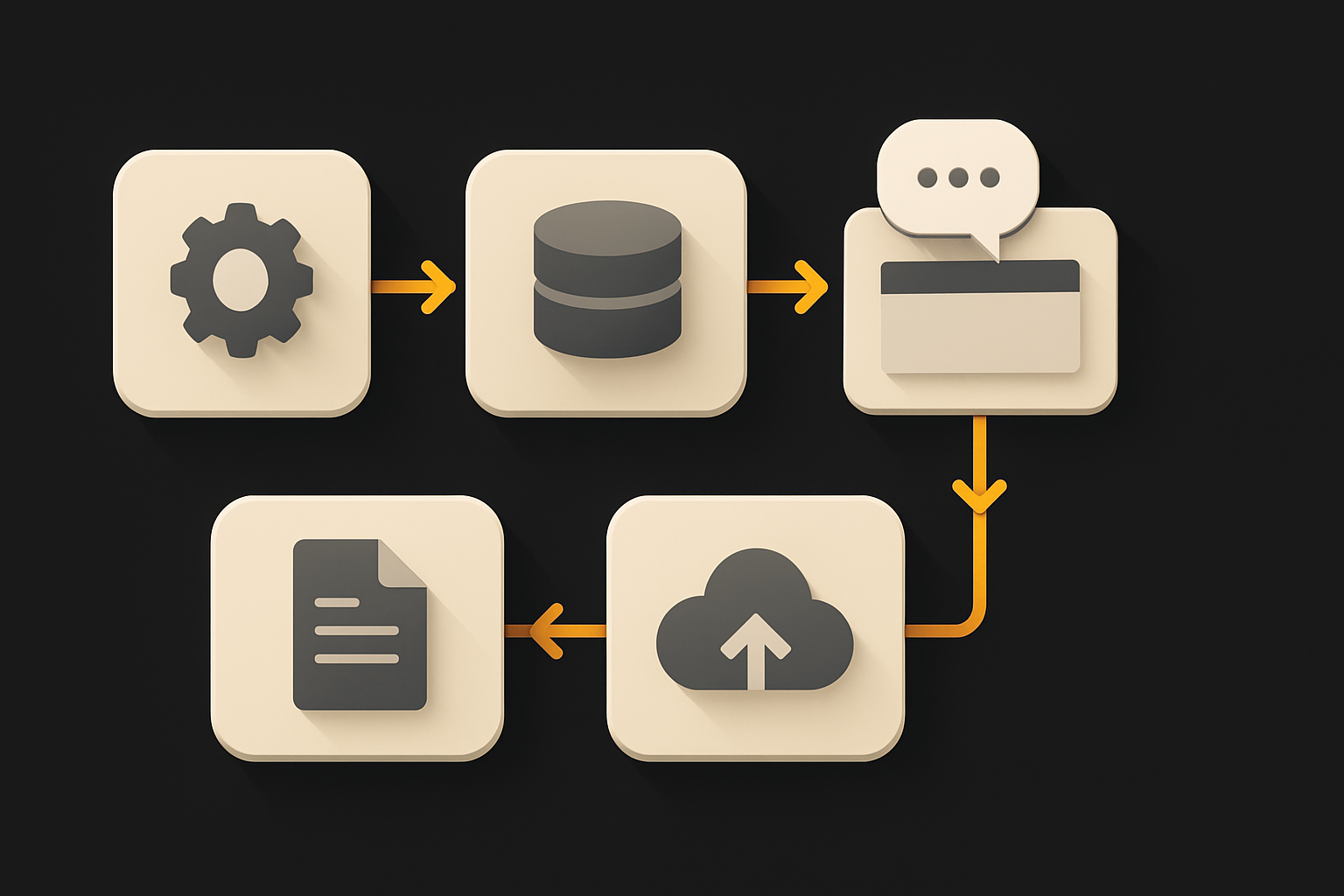
.
The key shift is task scope. A completion feature suggests text near the cursor. An agent can work across the files needed for a bounded change. That does not make a repository self-explanatory. It makes missing project decisions more visible, because the agent has to choose a pattern before it can change several files consistently.
Apple’s official announcement about Xcode 27 and new intelligence capabilities is the source for the release timing and availability. It also makes clear that Xcode 27 was offered as a developer beta, so beta behavior and UI should not be treated as a stable contract without checking the current release notes.
What should an agent inspect before editing?
Start with the project’s existing structure. Ask for an inventory, not a feature implementation. A good first pass identifies the app targets, schemes, tests, generated files, package dependencies, signing configuration, and the existing pattern for the screen or service you want to change.
Inspect this Xcode project before making changes.

Report:
- targets and schemes relevant to the requested feature
- the existing implementation of two similar screens
- test targets and the commands or actions used to run them
- generated files and files that must not be edited directly
- signing, entitlements, permissions, and environment assumptions
- conflicts between existing patterns

Do not edit files. Stop if the project does not contain a clear canonical pattern.
This prompt is intentionally boring. It prevents the agent from treating the nearest example as the correct one. If two screens handle loading, errors, or navigation differently, make the decision explicit before asking for a broad diff.
Put durable decisions in the repository’s developer documentation where your team can review them. Include the build scheme, test destination, naming rules, data boundaries, and the evidence required for a handoff. A conversation answer can unblock one task; a checked-in rule helps the next task start from the same assumptions.

12 production screens. Login and database wired.
The SaaS Dashboard Kit includes login, a database, and a working dashboard. Live demo at saas.otf-kit.dev.
How should you use Xcode 27 agents for a feature?
Split the feature into inspection, implementation, and verification passes. Keep the first implementation small enough that a human can read the entire diff.
Implement the smallest vertical slice of this feature.

Constraints:
- reuse the existing navigation and state pattern
- do not change signing, entitlements, or network permissions
- add loading, empty, error, and success states
- write or update the focused tests
- run the project’s existing build and test checks
- report every changed file and any check you could not run

Stop after the focused checks. Do not refactor unrelated files.
A vertical slice should show the complete path from user action to visible result, even if it handles only one data case. That gives you a better review surface than asking for ten screens and discovering at the end that the agent chose ten different state models.
Require the agent to return evidence with the diff:
- the scheme and destination used for the build;
- the test target and result;
- screenshots or a short recording for meaningful UI changes;
- any permissions or entitlements it touched;
- a list of known limitations.
A green build is necessary, not sufficient. A screen can compile while its keyboard behavior, VoiceOver labels, deep link handling, or offline state is wrong. Put those checks in the acceptance criteria instead of hoping the agent infers them from the request.
What does “build and test” mean in practice?
Define the check before the agent starts. For an app change, that may include a simulator build, unit tests, UI tests, and a physical-device pass. For a library change, it may include multiple deployment targets and sample applications.
Use a compact handoff record:
## Verification

- Scheme: App-Debug
- Destinations: iPhone simulator, one physical iPhone
- Unit tests: required
- UI tests: required for login and checkout paths
- Manual checks: keyboard, dynamic type, dark mode, offline launch
- Evidence: build log, test result, two screenshots
Replace the values with the project’s actual names. The record is a contract, not a universal Xcode command list.
When the agent reports a failure, preserve it. Ask whether the failure is caused by the change, the environment, or a pre-existing issue. Do not ask the agent to “make the tests pass” without letting it explain the failure; that wording encourages edits to the test or a weakening of the assertion.
For a larger migration, use checkpoints. Have the agent update one representative screen, run the checks, and wait for review. Only then expand the pattern. This is the same control that matters when Claude Opus 4.8 asks for missing repository context: an explicit question is cheaper than a confident change across the whole codebase.
What should Apple developers verify in the beta?
Treat Xcode 27 as a beta until the current Apple release page says otherwise. Apple’s developer release listing shows Xcode 27 beta builds and points to the current downloads and release notes. Check that page before installing a new beta on a production-critical machine.
Verify five things before moving a team over:
- Project compatibility: open each target and confirm packages, build settings, schemes, and generated files behave as expected.
- Agent boundaries: test whether the agent respects a no-touch list for signing, secrets, generated code, and release configuration.
- Build reproducibility: run the same build on a clean checkout, not only in the workspace where the agent edited files.
- Test evidence: compare the agent’s reported checks with the checks your CI actually runs.
- Review ergonomics: confirm that a developer can understand, reject, or revert the agent’s changes without losing unrelated work.
Keep the beta isolated from release automation until these checks pass. A developer tool can be useful in a branch while remaining unsuitable for an unattended production pipeline.
How does this compare with using an external coding agent?
The advantage of an in-IDE agent is context and feedback proximity. The agent can work beside the project, build configuration, documentation search, and test workflow that Apple developers already use. That reduces the number of handoffs between “generate code,” “open the IDE,” and “discover the project does not build.”
The tradeoff is that the agent inherits the project’s local ambiguity. If the repository has duplicated navigation patterns or undocumented permissions, the IDE does not resolve that product decision for you.
A practical comparison is not “which agent writes more code.” Measure:
- time from task start to a reviewable diff;
- number of clarification questions;
- build and test success on a clean checkout;
- manual edits after review;
- regressions found on physical devices;
- whether the project documentation became clearer after the task.
For teams shipping across web and mobile, cross-platform release checks show why device and build evidence still matter even when the code is shared. For longer-running model work, background jobs for AI features covers the separate state and retry boundary that an IDE agent does not replace.
OTF’s full-stack app templates are a complementary starting point for teams that want owned application code, shared web and mobile components, AI-tool configuration, and deployment scripts before an agent takes on feature work. The point is not to avoid Xcode 27. It is to give any coding agent a repository with fewer unanswered architectural questions.
Xcode 27’s AI agents are worth testing because they bring project-aware coding, builds, tests, and documentation search into one Apple development loop. Start with a read-only inventory, define acceptance checks, review a small vertical slice, and verify the result on a clean checkout and real devices. The agent can shorten the edit loop; the repository and its tests still decide whether the app is ready.
Sources
Originally published at otf-kit.dev — full-stack app templates for web and mobile. See the templates →

Ship the product, not the setup.
- 12 production screens — auth, team, analytics, and settings
- Login and a real database are wired in
- AI configs pre-tuned so your agent extends instead of regenerates
Ship your first screen tonight — free starter in your inbox
The quickstart, the SDK repo and the live kit demos, on this screen and in your inbox.
No spam. Unsubscribe any time.