NativeWind is Tailwind classes on React Native — components are still yours

NativeWind is a styling engine, not a component library. You get Tailwind-style className strings on React Native views. You still design Button, Card, Dialog, Sheet, Tabs, and every other surface yourself.
That distinction is the whole decision. Teams who already think in utilities and want the same DX on Expo often pick NativeWind for good reasons. Teams who thought they bought a design system discover the empty middle layer: a compile-time styling stack with zero designed components.
This post is for builders shipping with Cursor or Claude Code who are choosing between a utility layer and a designed cross-platform kit. It sits next to Tamagui as engine vs designed system and the shadcn-on-React-Native copy-paste reality. It is not another “web-only library vs mobile” rewrite.
What NativeWind actually is
The NativeWind homepage states the promise plainly: style React Native apps using Tailwind CSS, with the utility-first workflow carried into React Native. Installation docs (v4 path, verified 2026-09-15) wire Expo through nativewind, Tailwind, Babel presets, and withNativeWind on Metro. The “try it out” sample styles View and Text with classes like flex-1, items-center, bg-white, and text-blue-500.
That sample is the product boundary in miniature. NativeWind teaches you how to style primitives. It does not ship a Button.
The live compare page at otf-kit vs NativeWind frames the same split: NativeWind is a styling layer; a designed kit sits on top of a cross-platform engine and ships the components.

The stack you are buying
Think in three layers:
- Styling engine — compile-time utilities (NativeWind) or a peer engine (Tamagui and friends).
- Component inventory — Button, Input, Dialog, Sheet, DataTable, Form controls. NativeWind leaves this empty.
- Product spine — auth, database, payments, agent prompts, deploy scripts. NativeWind leaves this empty too.
If your team already owns layers 2 and 3, NativeWind is a sharp tool. If you hoped layer 1 would invent layers 2 and 3, you will spend the next month writing Pressable wrappers while agents invent inconsistent APIs.


One codebase. iOS, Android, and web.
The Fitness Kit is a mobile starter with its own API, with sign-in and a database. Live demo at fitness-preview.otf-kit.dev.
When NativeWind is the right default
Stay on NativeWind when most of these are true:
- You already have a design language and will implement components yourself.
- Your team has Tailwind muscle memory and wants the same class strings on RN.
- You want the styling primitive, not a component catalog.
- You are comfortable maintaining your own accessibility and interaction patterns for every control.
- Agent prompts document your custom component folder as the source of truth — not “use NativeWind Button,” which does not exist.
Under those conditions, picking NativeWind is scope control. You are choosing DX for styling, not outsourcing product UI.
When the empty middle becomes the product
Switch the default — or refuse to start on utilities alone — when any of these show up:
- Every PR reinvents Button padding, disabled states, and press feedback.
- Design review keeps asking why Sheet on iOS and Dialog on web feel like different products.
- Agents paste random
classNamesoups because there is no shared component API in the repo. - You need 80% of common surfaces already designed so Cursor or Claude Code can extend product screens instead of inventing primitives.
- You want a kit with auth, database, and payments in the same owned monorepo as the UI.
That is the honest matrix on the compare page: NativeWind gives you the syntax; a designed kit gives you the components (and optional full-stack starters).
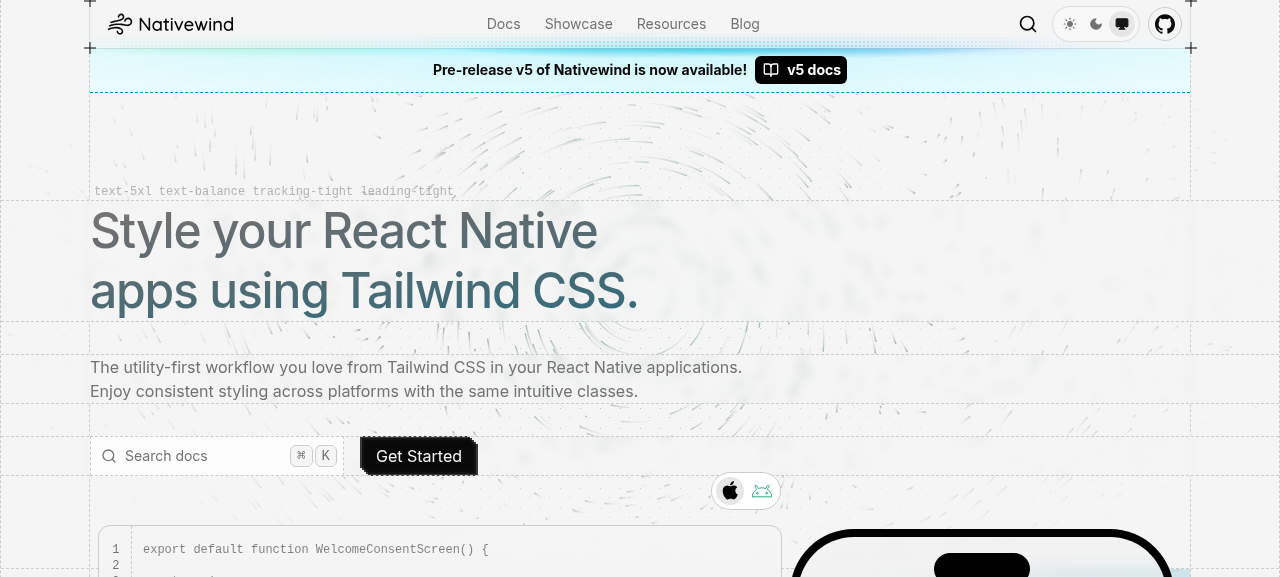
NativeWind homepage (https://www.nativewind.dev/), captured 2026-09-15 — public marketing page positioning Tailwind-style utilities for React Native.
Practical Expo install (styling layer only)
Verified against the NativeWind installation guide (v4.2.7 path on the docs page, updated 2026-09-14). Install surface for Expo:
npm install nativewind@4.2.7 react-native-reanimated react-native-safe-area-context
npm install --save-dev tailwindcss@^3.4.17 prettier-plugin-tailwindcss@^0.5.11 babel-preset-expo
Minimal try-it component from the same guide:
import "./global.css"
import { Text, View } from "react-native";

export default function App() {
  return (
    <View className="flex-1 items-center justify-center bg-white">
      <Text className="text-xl font-bold text-blue-500">
        Welcome to Nativewind!
      </Text>
    </View>
  );
}
That is a successful NativeWind setup. It is also proof you still need a component layer. The compare page’s illustrative Button contrast is the same idea: with NativeWind you write the Pressable + Text yourself; with a designed kit you import a finished Button.
If you later want components built on NativeWind specifically, the NativeWind site points at companion libraries (NativewindUI, React Native Reusables, gluestack). Those are separate products. They do not turn the styling engine into a full-stack kit with auth and Stripe.
Utility ownership vs designed-kit ownership
| Keep NativeWind (utility ownership) | Move to a designed cross-platform kit |
|---|---|
| You will author every component | You want 80+ designed native components already shipped |
| Tailwind class strings are the team dialect | You want a shared component API agents can call |
| Styling layer only — backend exists elsewhere | You want auth/Stripe/DB spine in the same repo |
| Happy maintaining a11y and variants yourself | Prefer themes and variants as product defaults |
| Compare page “design every component yourself” fits | Compare page “designed kit on a similar engine” fits |
Standup checklist:
- Name the three layers: engine, components, product spine.
- If layer 2 is empty, estimate weeks to rebuild common controls before feature work.
- Put the canonical component import path in agent docs so prompts stop inventing APIs.
- Read otf-kit vs NativeWind before mixing utility-only screens with a kit.
- If you need an owned starting product, open templates — SaaS Dashboard, Fitness Expo kit, Booking kit — instead of hoping utilities invent them.
For choosing a starter without a rewrite tax, see choose a starter kit without a rewrite. For Material-on-web decisions that are a different fork entirely, see Material UI web-first.
Agents make the empty middle expensive
Cursor and Claude Code are excellent at filling patterns that already exist in the repo. They are also excellent at inventing three different Button APIs when no shared component module is present. With NativeWind alone, the training signal for an agent is className strings on primitives. That produces screens that compile and still fail design review.
Put a thin owned component folder in the repo even if you stay on NativeWind. Export Button, TextField, and Sheet with documented props. Point agent rules at those exports. The styling engine stays NativeWind; the API surface becomes yours.
If you do not want to maintain that folder, you are describing a designed kit — which is a different purchase than a utility class compiler.
Coexistence without confusion
The compare page notes NativeWind and a designed kit are not always mutually exclusive. Some teams keep kit components for the common 80% and drop to bare View + NativeWind classes for one-off layouts. That works only when the boundary is explicit in the repo: kit imports for product UI, utility classes for local layout chrome.
Without that boundary, agents mix both styles in the same screen and you inherit the dual-system tax NativeWind was supposed to avoid.
What to do next
NativeWind is the right tool when you want Tailwind-class DX on React Native and accept that components are yours. The day you need a designed inventory — or a kit spine Cursor and Claude Code can extend — buy the layer you are missing instead of pretending className is a design system.
Start from the verified compare page and otf-kit.dev/templates when the empty middle is the real backlog.
Sources
- NativeWind homepage — Tailwind-style utilities for React Native; companion libraries listed (NativewindUI, Reusables, gluestack)
- NativeWind installation — Expo install,
withNativeWind, try-itView/Textsample; v4.2.7 notes dated 2026-09-14 - otf-kit vs NativeWind — styling layer vs designed kit; when each wins
- otf-kit templates — SaaS Dashboard, Fitness Expo kit, Booking kit, and related starters

Stop wiring. Start shipping.
- Sign-in and a database wired in, with its own API
- iOS + Android + web from one codebase
- AI configs pre-tuned + 20+ task prompts per kit included
Ship your first screen tonight — free starter in your inbox
The quickstart, the SDK repo and the live kit demos, on this screen and in your inbox.
No spam. Unsubscribe any time.