Staged OTA rollouts catch bad Expo updates before everyone gets them

An over-the-air update that reaches every user at once is a single point of failure wearing a shipping shortcut as a disguise.
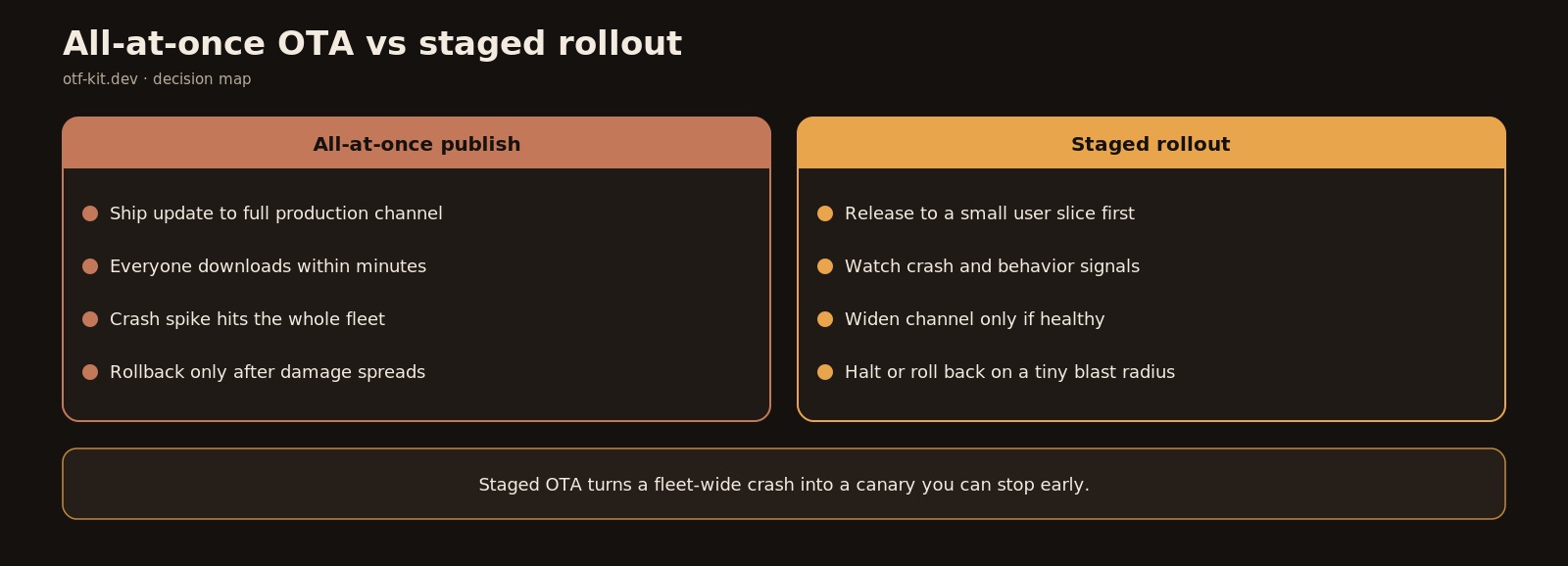
Staged rollouts shrink blast radius before a bad update reaches the whole fleet. You fix a typo in the checkout screen, tap publish, and ten minutes later your crash dashboard is a wall of red — on an update you can roll back, but only after everyone already downloaded it.
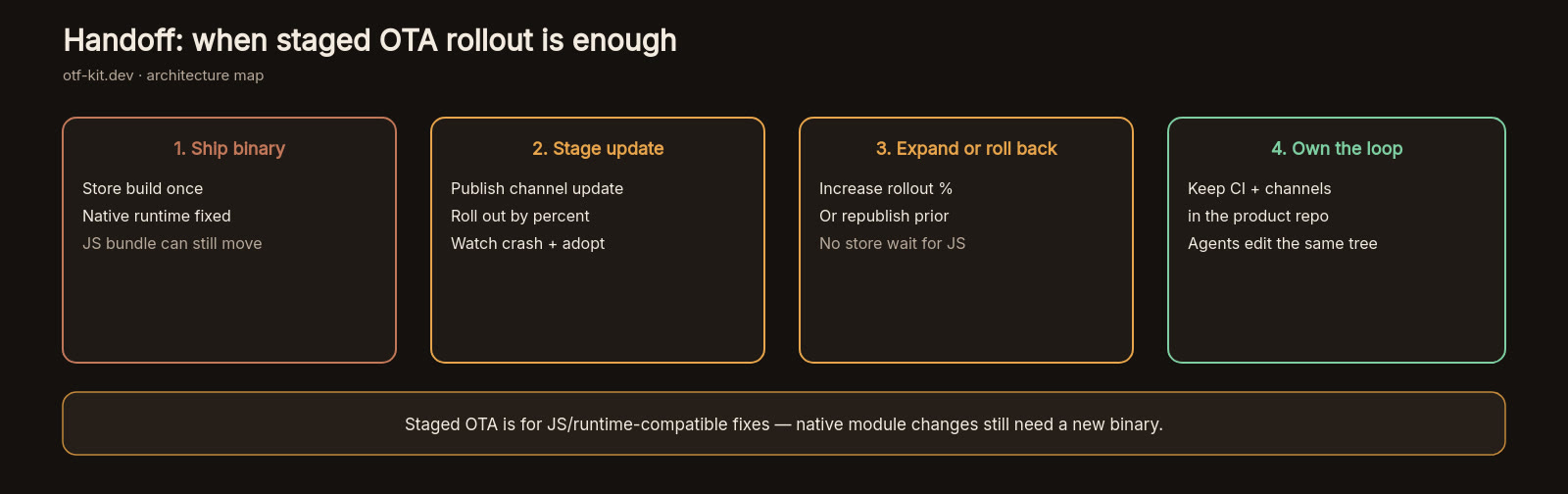
Staged rollouts fix this. Instead of publishing an EAS Update to your whole production channel in one shot, you release it to a small slice of users first, watch real crash and behavior data, then widen the slice. It is the same discipline web teams learned with canary deploys, applied to Expo OTA updates where the feedback loop is slower and the cost of a bad push is higher.
This post lays out the full discipline: how staged OTA rollouts work with EAS Update channels and branches, the exact ramp sequence we recommend, what to watch at each stage, and the guardrails that make the whole thing automatic enough that a small team actually does it every time.
Why all-at-once OTA is riskier than it feels
OTA updates feel safe because they skip app store review. No two-day wait, no staged-release console, no version gating — just publish and every user gets the fix on next launch. That speed is the entire point of tools like EAS Update, which serves new JavaScript bundles and assets to apps running the expo-updates library without a store submission.
But that speed cuts both ways. A bad OTA bundle lands just as fast as a good one, and unlike a store release there is no built-in phased rollout percentage to catch it. If your update breaks startup on a specific Android version, or a new asset path 404s on devices with a cold cache, the blast radius is your entire user base before you finish reading the first crash report.
The sibling discipline is the rollback plan — knowing how to revert a bad update fast, which we covered in our EAS Update rollback guide. Rollbacks limit how long a bad update lives. Staged rollouts limit how many users ever see it. You want both: staging to shrink the blast radius, rollbacks to kill what slips through.
How staged rollouts map onto EAS channels
EAS Update organizes delivery around channels and branches. A channel is what your builds point at (typically production); a branch is a line of published updates; you link branches to channels to decide which update a given group of users receives. This indirection is what makes staging possible: instead of pointing every user at the same branch tip, you route slices of traffic through separate channels or branch states and promote the update along as each stage clears.
In practice, small teams run one of two shapes. The first is channel-per-stage: builds or runtime logic assign users to production-canary, production-early, and production channels, and you publish the update to each in sequence. The second is branch promotion: you publish to a staging branch, verify it against internal and beta builds, then point the production channel at the verified branch. Either shape works. What matters is that promotion between stages is a deliberate, checklisted step — never an automatic push to everyone because the first five minutes looked quiet.
Your channel strategy also interacts with native configuration. Runtime version mismatches are the classic way a staged rollout silently fails — users on an older binary never receive the update and your "5% canary" is actually 5% of a subset. Keep your Expo config plugin and native build discipline tight so the population you think you are staging is the population actually receiving updates.
One codebase. iOS, Android, and web.
The Fitness Kit is a mobile starter with its own API, with sign-in and a database. Live demo at fitness-preview.otf-kit.dev.
The ramp sequence we recommend
For most production Expo apps, a four-stage ramp balances safety against velocity:
Stage 1: internal (your team, 0 to 24 hours). Publish the update to an internal channel consumed by team devices and TestFlight/internal-track builds. Exercise the changed flows by hand. This catches the embarrassing breaks — the null dereference on the screen you rewrote, the missing asset — before any real user is involved. Minimum dwell: one working session, not five minutes.
Stage 2: canary (1 to 5% of users, 24 hours). Promote to a small slice of production. Twenty-four hours matters because mobile usage is diurnal — a lunchtime publish that looks clean at dinner has not yet survived a morning commute on flaky cell connections. Watch crash-free sessions and the specific screens the update touched, not just the global crash count.
Stage 3: early majority (25 to 50% of users, 24 to 48 hours). If the canary is clean, widen decisively. This stage exists to surface device-fragmentation issues — the budget Android phone running an OS version your team does not own, the tablet layout you forgot. Half your users seeing a problem is still bad, but it is recoverable, and this is where fragmentation bugs statistically appear.
Stage 4: full production (100%). Promote to the whole channel. Keep monitoring for another 48 hours, because long-tail issues — expired cached assets, users who launch the app once a week — arrive late.
Hotfixes compress this, they do not skip it. A crash-loop fix still spends at least an hour on canary before going wide. The update that "obviously" only fixes one thing is exactly the update that breaks something else.
What to watch at each gate
Every promotion gate needs a numeric answer, decided before the rollout starts. The three signals that matter:
Crash-free sessions, scoped to the update. Compare the staged cohort running the new update against the baseline cohort still on the old one. A global crash rate can hide a staged regression inside a large healthy population — always slice by update ID. Our rule: promote only when the staged cohort's crash-free rate is at or above baseline for the full dwell period.
Release health around the touched flows. Global stability is necessary but not sufficient. If the update changed checkout, watch checkout completion and error rates specifically. General release-health monitoring for AI-built apps gives you the dashboard; staged rollouts tell you which slice of it to stare at before promoting.
Update adoption itself. An update nobody downloads teaches you nothing. Track what fraction of the staged cohort has actually fetched and launched the new bundle. Promoting on six hours of data where only 30% of the canary slice has updated is promoting on hope. Wait for meaningful adoption — typically 70%+ of the staged slice — before reading the signals as green.
Write these gates down as thresholds, not vibes. "Crash-free within 0.2 points of baseline, 70% adoption, 24h dwell" is a gate. "Looks fine" is a guess.
Guardrails that make staging stick
The reason teams abandon staged rollouts is friction: publishing to three channels by hand, remembering to check the dashboard, promoting on a Friday evening because someone is impatient. Three guardrails fix this:
First, script the publish sequence. One command or CI job that publishes to the canary channel, with promotion to the next stage as an explicit second invocation — never a single command that goes to 100%. If your AI coding assistant generates the release scripts, keep them under the same repo conventions as everything else so the next agent run does not invent a shortcut around the stages.
Second, put the gates in your release checklist next to the rollback steps. The gate thresholds (crash-free delta, adoption floor, dwell time) should sit in the same document as the rollback command, so whoever is on release duty sees both. Staging without written gates degrades into "wait a bit, then ship it" within a month.
Third, never roll out on a schedule your monitoring cannot cover. A canary published Friday at 6pm with nobody watching until Monday is worse than no canary at all — it gives you false confidence while the dwell period burns unwatched. Time stage promotions for hours when someone will actually read the dashboard.
Staging is cheap insurance
A staged OTA rollout adds roughly two days to the full propagation of a non-urgent update. In exchange, the worst case changes from "every user got the bad bundle" to "five percent did, and we halted promotion." For a team shipping weekly, that trade pays for itself the first time a canary catches a startup crash on a device nobody on the team owns.
Set up the channels once, write the gates down, script the sequence — then every future update ships with a safety net you barely have to think about.
Sources
- EAS Update introduction — Expo documentation
- Internal: EAS Update rollback plan · Expo config plugins in production · Release health for production AI apps
Stop wiring. Start shipping.
- Sign-in and a database wired in, with its own API
- iOS + Android + web from one codebase
- AI configs pre-tuned + 20+ task prompts per kit included
Ship your first screen tonight — free starter in your inbox
The quickstart, the SDK repo and the live kit demos, on this screen and in your inbox.
No spam. Unsubscribe any time.