
VS Code 1.129 lets one AI agent session move across multiple windows

VS Code 1.129 changes AI agent sharing by moving sessions into a dedicated Agent Host process. A session can now be connected to and rendered from multiple VS Code windows, so closing the window where work began no longer has to end the review context. The release also adds an Agents editor panel, session-management tools, worktree isolation, and a direct ! command path.
The practical value is not that every agent should run everywhere. It is that a long-running task can have a stable session owner while different windows act as clients: one for the main editor, another for a diff review, and another for a related workspace. The boundary is useful only if the team understands what is shared, what is local to a client, and which actions still require confirmation.
What is the Agent Host in VS Code 1.129?
The VS Code 1.129 release notes describe the Agent Host as a dedicated process that runs agent harnesses and lets multiple windows connect to the same session. The release names Copilot, Claude, and Codex as agent-host harnesses, and says the host is based on the Agent Host Protocol.
The Agent Host architecture documentation adds the important model: the host owns sessions independently of the clients that display and control them. A client can disconnect while the session remains available, and multiple clients can observe and control the same session while staying synchronized.
client window -> Agent Host -> agent session -> workspace
client window -> Agent Host -> same session
Use a `
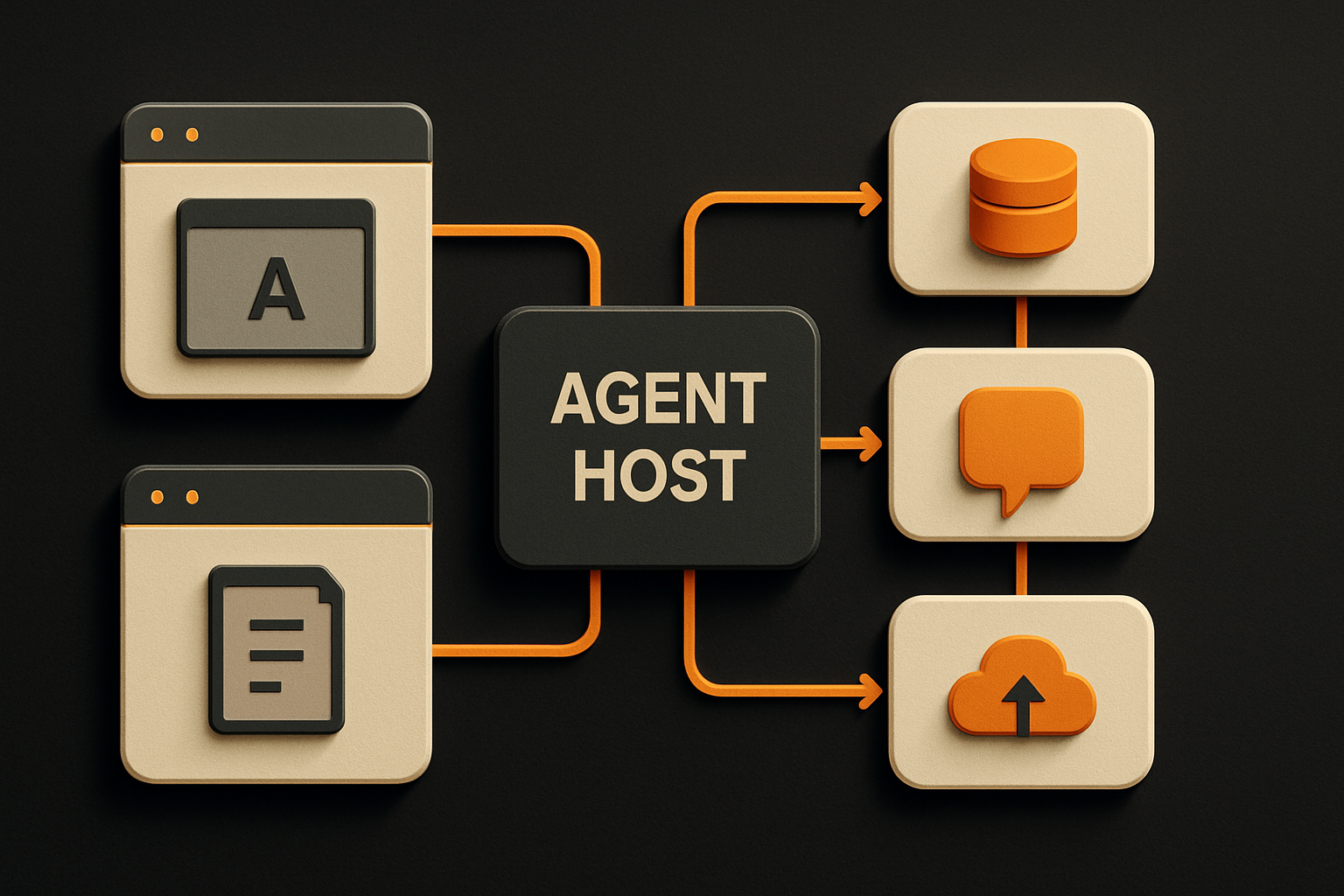
` marker for the architecture rather than drawing it in text. The window is now a view and controller; it is not necessarily the lifetime of the work.
The Agent Host and its protocol remain under active development. Treat new capabilities as versioned product behavior, not as a permanent compatibility promise.
How do you enable shared agent sessions?
The release notes document the chat.agentHost.enabled setting. After enabling it, choose an agent-host harness from the harness dropdown. The exact harnesses available depend on your installation and account access.
Start with a low-risk test workspace:
{
  "chat.agentHost.enabled": true
}
Use the Settings UI or the project’s approved settings process to apply the setting. Do not commit a personal account choice into a shared workspace file unless the team has decided that the setting belongs there.
Then test the session lifecycle:
- Open a non-production repository in one window.
- Start an agent-host session.
- Ask for a read-only inventory of files and test commands.
- Open the same session from a second window.
- Confirm that both windows show the same conversation state.
- Close the first window and confirm the second can continue the review.
- Stop before allowing a file edit or terminal command.
A useful read-only prompt is:
Inspect this repository without editing files or running mutating commands.

Return:
- the repository root
- two files that implement a similar feature
- the test command for that feature
- generated files that must not be edited directly
- any conflicting conventions

Show the paths you inspected and stop.
This verifies shared context without mixing the feature test with a risky change.
11 production screens. Login and database wired.
The SaaS Dashboard Kit includes login, a database, and a working dashboard. Live demo at saas.otf-kit.dev.
What can the new Agents editor panel do?
The Agents window’s experimental editor panel puts the agent conversation beside the files and changes it produces. The release notes say you can open files and diffs in a docked editor, use inline or side-by-side diff views, expand or collapse files, and access a next action such as creating a pull request from the editor tab title.
The panel is enabled with:
{
  "sessions.layout.singlePaneDetailPanel": true
}
The release notes say this setting is read at startup, so reload the window after changing it. Because the panel is experimental, test it in a normal development profile before making it part of a team-wide workflow.
The panel is most useful when the review is the task. Keep the chat and diff visible together, ask the agent to explain one changed file, and compare that explanation with the actual code. Do not accept a large diff simply because the UI makes it easy to navigate.
For a feature change, require these review states:
- files changed;
- tests added or updated;
- checks run and their result;
- permissions, configuration, or generated files touched;
- unresolved questions.
The panel improves the handoff between conversation and code. It does not turn a generated diff into an approved change.
How do session-management tools work?
The 1.129 release gives agent-host sessions tools to enumerate, create, observe, and act on other sessions and chats. An agent can list sessions with status, workspace, and changes; read another session’s recent conversation; create a session or chat for a subtask; and send a message to a session it created.
VS Code renders an Open Session pill when a tool creates or targets a session. The release notes also say that sending a message to another session asks for confirmation first and that a burst of sends is capped.
That is a useful guardrail for parallel work. Keep the task graph narrow:
type AgentTask = {
  taskId: string;
  parentTaskId?: string;
  workspace: string;
  allowedPaths: string[];
  status: 'planned' | 'running' | 'waiting-review' | 'done' | 'failed';
  checks: string[];
};

function mayCreateSubtask(task: AgentTask) {
  return task.status === 'running' && task.allowedPaths.length > 0;
}
This is an application-side record shape, not a VS Code API type. It illustrates a policy worth keeping around any multi-session workflow: a child task has an owner, a workspace, allowed paths, and checks. Do not let “create a subtask” become permission to fan out across the repository without review.
Use worktree isolation when parallel tasks might touch the same files. The release notes add a New Worktree checkbox in new-session configuration. A separate worktree keeps an agent’s changes away from the main folder until you review and merge them.
What does the ! command change?
In agent-host sessions, you can prefix a chat message with ! to run its contents as a terminal command. That is convenient because the command is visible in the chat workflow, but it also makes prompt wording a direct path to shell execution.
Use it only with explicit, reviewable commands:
!git diff --statFor a mutating command, ask the agent to show the proposed command first instead of embedding approval in a broad instruction:
Show the exact command you would run to regenerate the fixture.
Do not run it until I approve the command and confirm the output path.
Keep production credentials and destructive operations outside a general agent session. A session that can inspect a repository may still have access to terminals, extensions, browser tools, or remote workspaces. Review the combined permission surface rather than treating the Agent Host as a sandbox by itself.
How do you keep shared sessions safe?
Shared control needs a clear owner. Decide who can approve terminal commands, who reviews diffs, and which files are always off limits. Do not rely on a session being visible to several people as a substitute for authorization.
Use a repository rule file with concrete boundaries:
## Agent boundaries

- Do not edit generated files directly.
- Do not change secrets, signing, or deployment configuration.
- Do not merge or publish from an agent session.
- Run the focused test before requesting review.
- Ask before changing dependencies or database migrations.
- Include the session, workspace, commit, and checks in the handoff.
The actual paths and commands should match your project. Keep rules short enough to stay current. Ask the agent to quote the applicable rule before editing so the review can distinguish a deliberate exception from an accidental one.
The Agent Host documentation says extensions can contribute tools, while the host manages the session independently. It also notes that extension-provided tools are available in the editor window where the extension is running. That means two clients connected to one session may not expose exactly the same client tools. Test the workflow from the windows and machines your team will actually use.
For authentication and sensitive data, use least privilege. Do not paste tokens into chat, do not print secrets while debugging, and do not assume a remote host changes the responsibility for access control.
How should you test a multi-window agent workflow?
Test a complete but reversible task, not only the session connection. Record the session state before and after each handoff:
Test task: add an empty state to one existing screen.

Checks:
- open the session in Window A
- inspect the matching screen
- open the same session in Window B
- review the proposed file list
- approve one edit
- run the focused test
- close Window A
- review the diff and test result from Window B
- discard the branch if the check fails
Compare the behavior of an agent-host session with an older extension-host session when your team still has both. The release notes say shared multi-window sessions, multiple chats per session, quick chats, and remote hosting are Agent Host capabilities. Existing extension-host sessions continue to run there, with different behavior for pending edits, customizations, autopilot, MCP configuration, and extension tools.
Do not mix results from those two execution models in one runbook. Name the host in the task record and verify the settings that select it.
This is the same evidence loop described in Cursor prompts for focused agent sessions: define the task, stop conditions, and handoff proof before the agent takes the next tool call. AI provider portability covers the separate model boundary, while the AI app security checklist covers tool permissions, secrets, output validation, and logging.
OTF’s templates are a complementary starting point for builders who want owned application code, shared web and native components, and pre-tuned AI configs for Cursor and Claude. A clearer repository makes multi-window agent work easier to review; the Agent Host still needs your access rules and acceptance checks.
VS Code 1.129’s Agent Host makes one coding session portable across windows and gives agents more deliberate session-management tools. Enable it in a test workspace, verify the shared lifecycle, isolate parallel work, keep ! commands reviewable, and record the host and checks in every handoff. The window is now a client; the repository contract remains the source of truth.
Sources
Originally published at otf-kit.dev — full-stack app templates for web and mobile. See the templates →
Ship the product, not the setup.
- 11 production screens — auth, team, analytics, and settings
- Login and a real database are wired in
- AI configs pre-tuned so your agent extends instead of regenerates